Home  /  Guide  /  QRZ and logbook

Guide · QRZ.com and logbook

QRZ Logbook:
two entries, one QSO

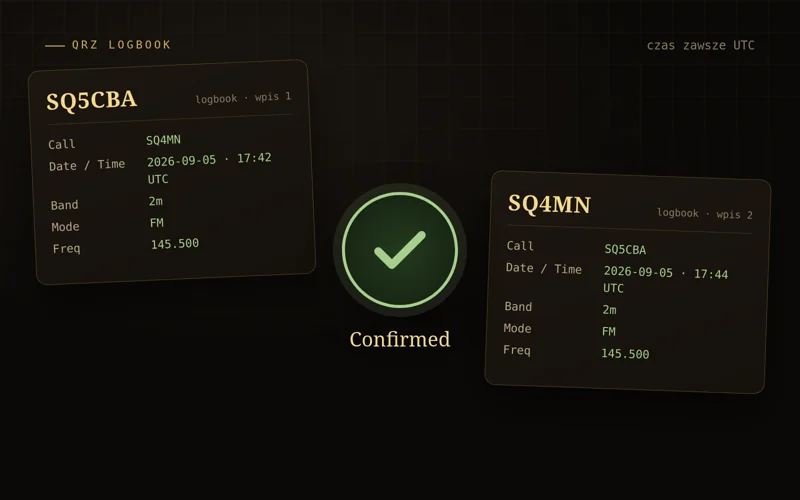
A QSO is only confirmed when both stations log it and both entries match: the same callsigns, the same band and the same frequency, the same mode, UTC time within a half‑hour window. The rest is optional. Below: account, entry, import from your program, and why a QSO is ‘pending’.

two entries UTC time ±30 min band and frequency same mode
Two logbook entry cards: SQ5CBA logs SQ4MN, SQ4MN logs SQ5CBA; same date, UTC time, 2 m band, frequency 145.500 and FM mode, a green confirmation tick in the middle
One QSO, two entries · callsigns, UTC time, band, frequency and mode match
In short

Four things that matter

2

Two entries

You log him, he logs you. One entry is half a QSO. Without the other side it will never be confirmed.

UTC

Universal time

In summer subtract 2 hours from Polish time, in winter 1. The date is in UTC as well.

±30

Half an hour’s leeway

The times in both entries may differ by up to 30 minutes. Any more and QRZ treats them as two different QSOs.

≡

Band, frequency, mode

2 m is 2 m, 145.500 is 145.500, FM is FM. Through a repeater both sides enter its output frequency.

QSL without the card

QRZ.com is the largest callsign database in the world and a free cloud logbook. An entry in it replaces the paper QSL card: the same fields we’ve been filling in on cards for a hundred years, namely callsign, date, UTC time, band, mode, report. The system is double‑blind: both sides enter the QSO independently, and QRZ checks whether the entries match and sets the status to Confirmed.

Free: account, logbook, manual entries, ADIF import, confirmations and QRZ awards. With a subscription: export, API key and LoTW sync.
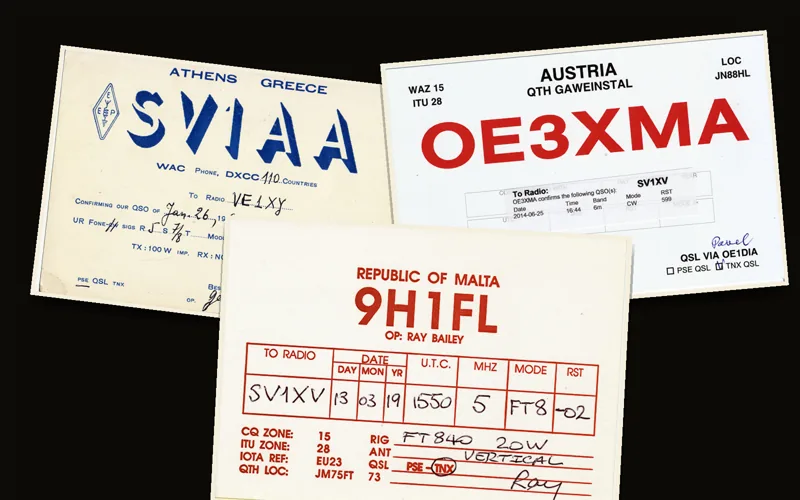
Three QSL cards: SV1AA from 1960, OE3XMA from 2014 and 9H1FL from 2019, with fields: correspondent’s callsign, date, UTC, MHz, mode, RST QSL cards from three eras · the same boxes you fill in today in the logbook · Wikimedia Commons, public domain
Before you start

Account and UTC clock

1

Account on qrz.com

Your callsign is your login. If it isn’t in the database, you add it via a form; QRZ verifies new callsigns, so activation can take from a few hours to a few days.

2

Callsign page

Name, QTH, locator, e‑mail for logged‑in users. When a QSO doesn’t match, your correspondent needs a way to find you.

You can work out your locator in the locator calculator
3

Logbook

Address logbook.qrz.com, the logbook for your callsign. Also operating as SQ5CBA/P? For QRZ that’s a different callsign and a separate logbook.

★

The midnight trap. A QSO at 00:30 Polish time in summer is 22:30 UTC on the previous day. Picking the calendar date will shift the entry by a whole day and get you zero confirmations.

Step by step

Manual entry: what goes where

Click Add QSO. The fields that affect confirmation are marked with a gold border.

Mock‑up of the “Add QSO” form in QRZ Logbook with example values Add QSOlogbook.qrz.com CallsignSQ4MN Date (UTC)2026-09-05 Time (UTC)17:42 Band2m Frequency (MHz)145.500 ModeFM Power (W)5 RST sent59 RST rcvd57 CommentsSimplex QSO on 145.500, 73! Name · QTH · GridMarian · Warsaw · KO02MF ← QRZ will fill these in from the correspondent’s profile Add Record the gold‑bordered fields determine confirmation
  1. Callsign. Exactly as they transmitted it: with the /P suffix only if they used it. You can’t edit the callsign in a saved QSO — delete it and re‑enter.
  2. Date and Time (UTC). Start of the contact. The “now” button inserts the current UTC time.
  3. Band and Frequency. Band from the list, frequency in MHz, exactly the same for both sides, e.g. 145.500. Via a repeater both sides enter its output frequency — for Wanda, 145.750.
  4. Mode. FM, SSB (USB and LSB count as SSB), CW, FT8. DMR and D‑STAR are DIGITALVOICE with a sub‑mode.
  5. RST, power, comment. Whatever you like; they don’t affect confirmation.
  6. Add Record. The entry remains unconfirmed until your correspondent adds theirs. Minutes or months.
The key points

What must match in both entries

SQ5CBAlogs
SQ4MNlogs
CallSQ4MN
✓ must
CallSQ5CBA
UTC05.09.2026 17:42
✓ ±30′
UTC05.09.2026 17:44
Band2m
✓ must
Band2m
Freq145.500
✓ must
Freq145.500
ModeFM
✓ must
ModeFM

Five fields identical on both sides: callsigns, UTC time within a ±30 minute window, band, frequency and mode. QRZ doesn’t compare reports, power or comments, so they can differ.

FieldDoes it have to match?Notes
Callsignsyes, exactly to the letterSQ4MN and SQ4MN/P are two different callsigns.
Date and UTC timeyes, ±30 minutesLocal time instead of UTC = 60 or 120 minutes difference.
Bandyes2m on both sides. QRZ derives it from the frequency.
ModeyesUSB/LSB = SSB, DMR/D-STAR = DIGITALVOICE. FM and SSB are two different modes.
Frequencyyes, the sameAgree on one: via a repeater both sides enter its output frequency, for Wanda 145.750. QRZ formally compares the band, but a single frequency in both logs is clean record-keeping and leaves zero doubt in other systems.
RST, power, comment, QTH, Maidenhead locatornoThey aren’t used for matching.
!

Baseline condition: the other station must use QRZ Logbook. If someone logs only in a notebook, LoTW or eQSL, nothing will be confirmed for you on QRZ.

Troubleshooting

Why a QSO is still unconfirmed

🕒

Local time

19:42 Polish time entered as UTC is a 120-minute difference in summer. Outside the window.

📅

Wrong date

After 22:00 UTC it’s already tomorrow in Poland. The local date ends up a day ahead.

/P

Suffix in the callsign

You entered SQ4MN, he logged in the SQ4MN/P logbook. Different callsigns, no match.

〰

Different mode

FM on your side, DIGITALVOICE on his, because you talked via DMR.

📶

Different band

A typo: 70cm instead of 2m, or cross‑band – each side logged their own transmit band.

✎

Typo in the callsign

SQ5CBA versus SQ5CBE. Delete the entry and add the correct one; editing the callsign isn’t possible.

Example: a QSO via Wanda

Band 2m, frequency 145.750 on both sides, Mode FM, UTC time, in the Call field the correspondent’s callsign, not the repeater. You can add the SR5W callsign in the comment.

When an entry is still unconfirmed: compare time, band and mode, correct your fields, and if your entry is good, message the correspondent from their callsign page. Don’t bend your log to fit someone else’s mistake.

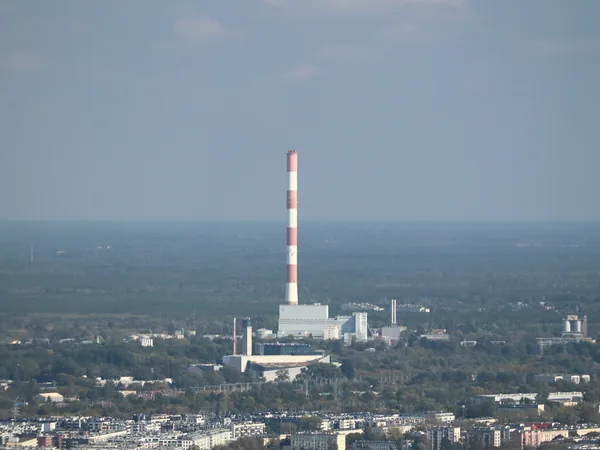
The Kawęczyn Heat Plant chimney with the SR5W repeater antenna, seen from Varso Tower above the roofs of Praga Kawęczyn chimney, Wanda’s home · photo: Cybularny, CC0
From software and by hand

ADIF import or a note on your phone

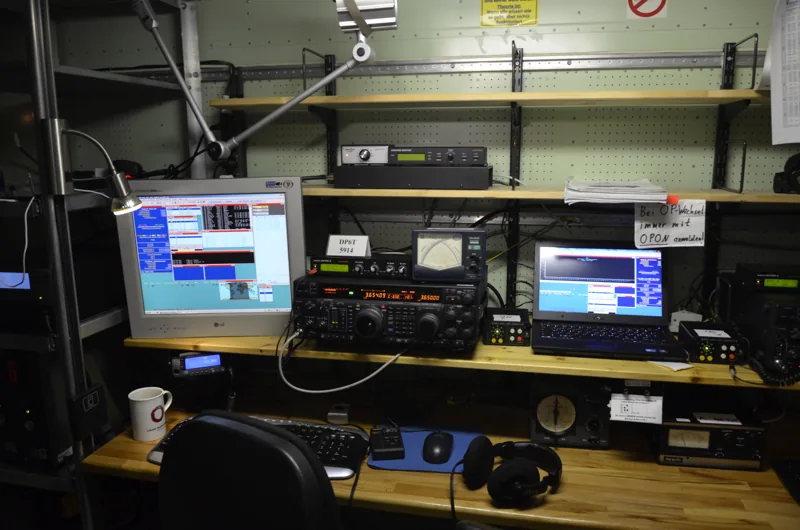
A contest operator’s position: transceiver, amplifier and two monitors with logging software Contest station: the software logs automatically, you upload the ADIF file to QRZ · photo: Ptolusque, CC BY-SA 4.0, Wikimedia Commons
  • ADIF is free. WSJT-X, N1MM+, Log4OM, Cloudlog save the log to an .adi file. In QRZ: Import/Export Tools → Import from ADI File. Time in ADIF is always UTC.
  • Duplicates (same callsigns, band, mode, time ±30 min) replace the old entry unless it was already confirmed. You can upload the same file twice.
  • Automation with a subscription. Enter your logbook API key in Log4OM, Cloudlog or GridTracker and every QSO lands in QRZ straight away.
  • Handheld and repeater. A note on your phone: callsign, UTC time, band, mode. In the evening, three manual entries take two minutes.
  • LoTW and eQSL confirm independently of QRZ: you can upload the same ADIF file to each, but every system matches its own pairs of entries.

QRZ, LoTW, eQSL or a card

Four ways to confirm the same contact, each counts towards different awards. QRZ is the simplest to start with: an account, ten minutes, zero certificates. ARRL’s LoTW needs a TQSL certificate and counts towards DXCC and WAS. eQSL sends electronic cards. Paper remains for collectors and the PZK (the Polish Amateur Radio Union) QSL bureau.

Common denominator of all four: both sides have to play ball. A confirmation is always a pair of entries.

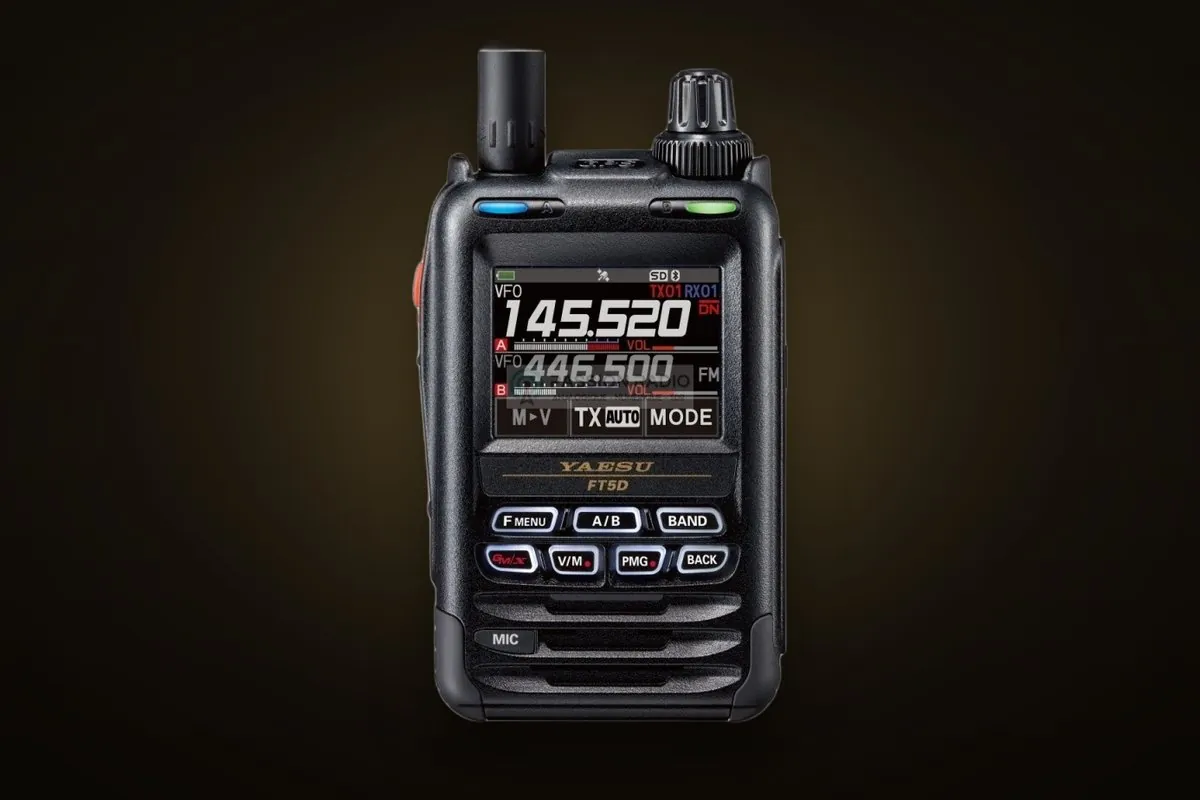
Yaesu FT-5D, a dual-band handheld transceiver with a colour screen After a QSO on a handheld: callsign, UTC, band, mode into a note · photo: SQ5CBA
Before clicking “Add Record”

Checklist

Eight points. Tick these off and your confirmations among QRZ users will be close to one hundred per cent.

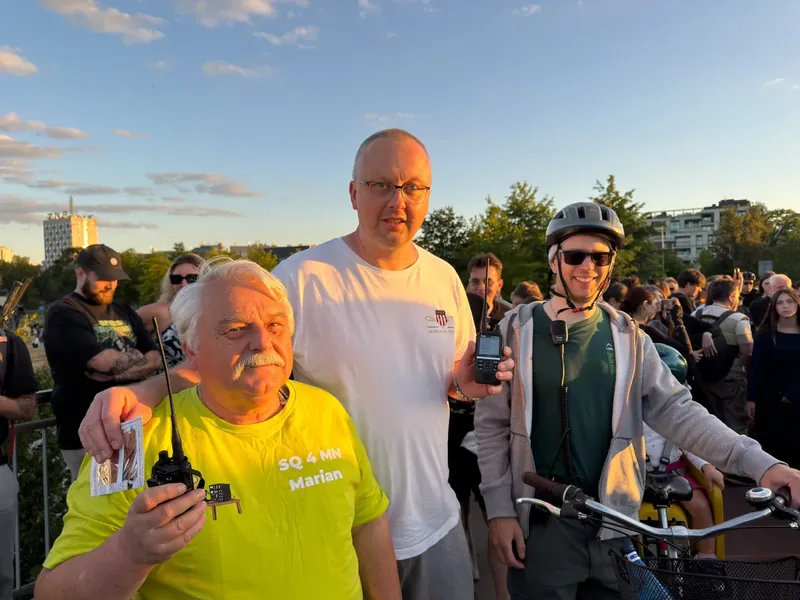
Three radio amateurs with handhelds on the Świętokrzyski Bridge at sunset: Marian SQ4MN, Filip SQ5CBA and Mikołaj SP5MAK SQ4MN, SQ5CBA and SP5MAK · the best test of a logbook is a QSO with a mate and two entries straight away
  • Correspondent’s callsign copied from their QRZ page, not from what you heard
  • Suffix /P, /M only if that’s how they were transmitting
  • Time in UTC: in summer minus 2 h, in winter minus 1 h
  • Date in UTC as well, especially after 22:00 Polish time
  • Band from the list, frequency in MHz with a dot
  • The mode you actually used
  • The correct logbook: for the callsign you were transmitting with
  • The correspondent knows you log on QRZ and will log it too
Cheat sheet

Most common questions

How long for the second entry?
No limit. The ±30-minute window applies to the QSO time, not when you enter it. An entry from years ago will confirm when the correspondent adds theirs today.
Wrong callsign in the entry
Delete the QSO and add a new one. QRZ doesn’t let you change the callsign, and deletion is irreversible.
Subscription and confirmations
Not needed. Confirmations, manual entries and ADIF import are free. A subscription gives you export, the API and LoTW.
EchoLink, hotspot, Zello
An internet contact isn’t a radio QSO and most awards won’t accept it. You can log it, but mention it in a comment.
Next step

Make your first confirmed QSO

Arrange with a friend via Wanda, both of you log the contact immediately after you finish and watch the status change to Confirmed.