Home  /  Curiosities  /  IC‑9700 in the browser

Station · software · report from two evenings

Claude Code and programming
IC‑9700 and FT8

On the evening of 8 October I asked: “could we program this IC‑9700 so I’d have an app in the browser?”. Less than two hours later I had a panel with analogue meters, PTT on the space bar, the radio’s memory channels, FT8 with an AUTOMAT button, and a contact history from QRZ.com. It was all written by Claude Code, an AI assistant running in the terminal; I told it what I wanted and checked things at the radio. The next day the panel made two FT8 QSOs on 2 m by itself. I’ll show how it works, how we built it, and what went wrong.

IC‑9700 over LAN no wfview or WSJT‑X Python on a home server 16 kHz audio both ways FT8 · ft8_lib Claude Code
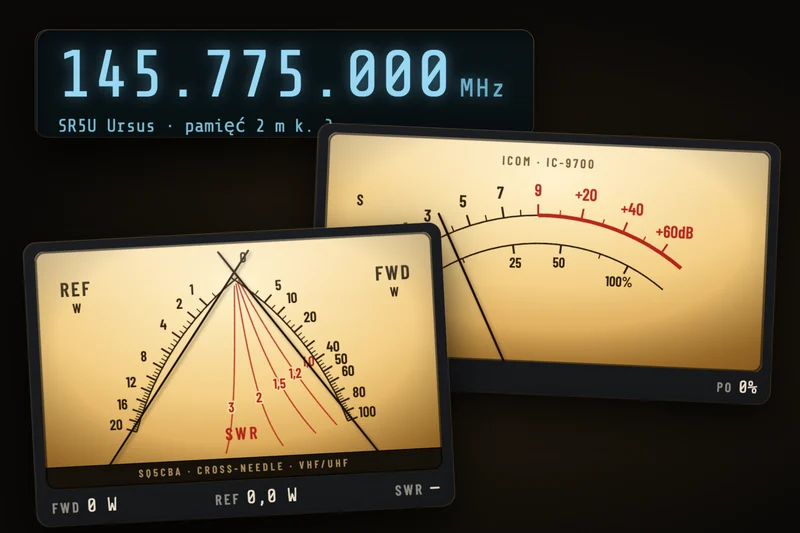
Collage from the IC-9700 panel: display with frequency 145.775 MHz and channel name SR5U Ursus, analogue S‑meter and cross‑needle power and SWR meter
first evening1.5 h

From idea to AUTOMAT

8.10 from 20:59 to 22:31: meters, control, TX from the laptop, channels, FT8 and history from QRZ. The second evening was for fixes and the band scope.

refresh~20 / s

I hit PTT and see it immediately

The service asks the radio for meters and settings continuously and pushes each new reading to the browser immediately, without waiting for the next batch.

code~2850

lines, not a single one by me

1,357 lines of Python on the server, 1,337 lines for the page and 158 lines for the scope. The server uses only Python’s standard library. For FT8 there’s numpy and two small programs from ft8_lib.

How the browser talks to the radio

One service instead of three programs

For my first FT8 QSO I needed wfview, two virtual sound cards and WSJT‑X on the Mac (I wrote it up in the article on FT8 on 2 m). Now, between the radio and the browser there’s a single service on my home server, on the same network as the IC‑9700.

Signal path of the IC‑9700 panel: the radio, the service on the home server, the browser, QRZ.com and Claude Code IC‑9700 on the home LAN speaks Icom’s protocol over UDP with the panel service on a server on the same network: control, CI‑V commands and 16 kHz audio. The service sends the radio state to the browser about 20 times a second, audio both ways and the scope spectrum, and accepts buttons and PTT. After an FT8 QSO it sends an entry to the QRZ.com log. Claude Code on the Mac connects to the server over SSH, writes code and restarts the service. At home · same LAN Laptop or phone · over the internet Icom IC-9700 LAN socket spectrum analyser single network session 2 m · 70 cm UDPcontrolCI-VaudioprotocolIcom Panel service home server · Python radio session like wfview CI‑V: reads ~20/s 16 kHz audio RX and TX spectrum 27 00 → scope PTT with safeguards FT8: ft8_lib + AUTOMAT ADIF log connects to the radio only, when someone’s viewing the panel Browser RADIO · FT8 · HISTORY meters with damping FT8 waterfall (FFT in the browser) laptop speaker and mic space = PTT password · non‑public address QRZ.com Logbook API: entry after each QSO and log to the HISTORY tab Claude Code (terminal on the Mac) SSH to the server · writes the service and page code · backup before change restart during FT8 receive period · reads the service log status PTT audio QSOs SSH radio status ~20/s (SSE stream) buttons and PTT (HTTPS) audio (WebSocket) Claude Code Over the network, only the service can see the radio. The browser does not connect to the radio directly.

← scroll sideways to see it all →

Signal path. IC‑9700 has a LAN socket and speaks Icom’s own protocol over UDP. The service logs into the radio like wfview, reads and sets it with CI‑V commands and receives audio. The browser gets the radio state as a stream, and audio over a separate bidirectional connection. The panel is password‑protected and I’m not publishing its address.

The radio accepts one client

IC‑9700 over the network supports one session at a time. So the service connects to the radio only when someone has the panel open, and 20 s after the last tab is closed it disconnects itself. There’s also a Release radio button for when I want to return to wfview or WSJT‑X on the Mac.

Protocol deduced from wfview

Icom’s network protocol isn’t in the radio’s manual. It was worked out by the authors of the open‑source wfview and is in their source code. Based on that, Claude Code wrote his own Python implementation: login, packets with CI‑V commands, the audio stream and keep‑alives. The audio both ways is 16‑bit mono samples, 16,000 per second.

CI‑V commands

It’s the same language as over the USB cable, just wrapped in UDP packets. Each read is a short question and answer. The service asks one question at a time and waits up to 0.25 s for the reply. The radio reports some changes by itself, e.g. when I turn the tuning knob.
CommandWhat the panel reads
03 · 04frequency, mode and filter
1C 00whether the radio is transmitting (also from the hand mic)
15 02S‑meter
15 11 · 12 · 13output power, SWR, ALC
15 15 · 16voltage and current
14 0A · 03 · 01 · 02power, squelch, volume, RF gain
16 02 · 11preamp, attenuator
0F · 0C · 1B 00duplex, offset, CTCSS tone
1A 00memory channels with names (in the background, 50 channels in a few seconds)
1A 05 0116DATA MOD menu: where modulation comes from in digital modes
27 00spectrum for the scope

On receive, on every pass the service queries the transmit state, the S‑meter and the frequency; on transmit it queries the power, SWR and ALC. It reads the rest of the settings in turn, one per pass.

RADIO tab · real screenshot

Everything the radio’s display shows

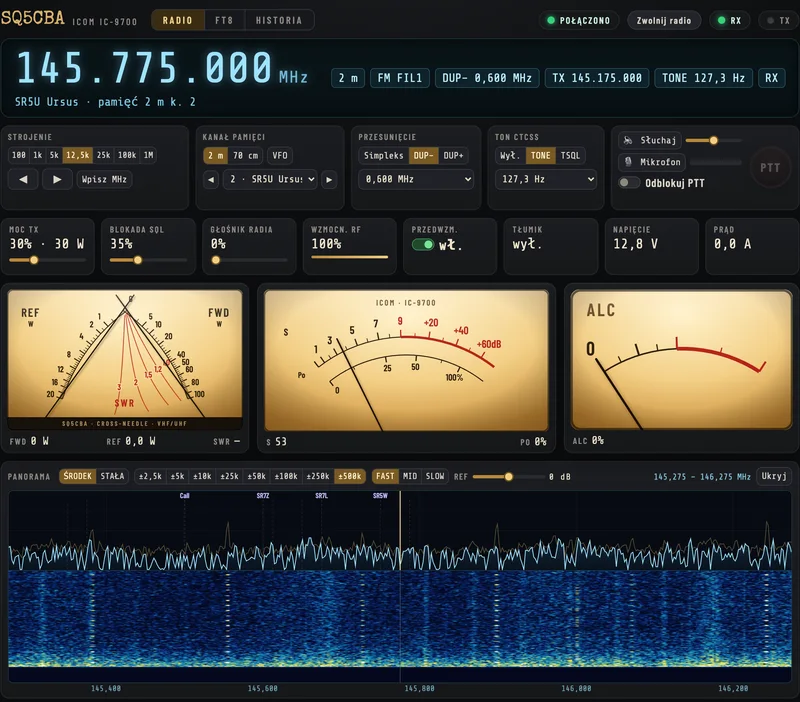
Screenshot from 10 October, 10:40: the radio is parked on repeater SR5U Ursus, on memory channel 2. Hover over the number or the label to see which part of the panel it refers to.

RADIO tab of the IC-9700 panel: display with frequency 145.775 MHz and channel name SR5U Ursus, control blocks, settings tiles, three meters and a spectrum scope with waterfall
  1. Receive frequency and channel name read from the radio’s memory. Click the digits to enter a new frequency.
  2. Radio state as on the display: band, mode and filter, duplex with offset, transmit frequency, CTCSS tone, RX or TX.
  3. Tuning in steps from 100 Hz to 1 MHz; holding the arrows repeats the step; “Enter MHz” to enter a frequency.
  4. Memory channel: band 2 m, 70 cm or VFO; a list of named channels and ◀ ▶ through channels 1–99.
  5. Offset: simplex, DUP− or DUP+ and the offset value.
  6. CTCSS tone: off, TONE (TX only) or TSQL (also squelch on RX), and tone selection.
  7. PTT: “Listen” and “Microphone” are audio via the laptop; “Unlock PTT” arms transmit. The round button or space = the hand mic.
  8. Settings tiles: power, squelch and the radio’s speaker with sliders, RF gain, preamp switch, attenuator, voltage and current.
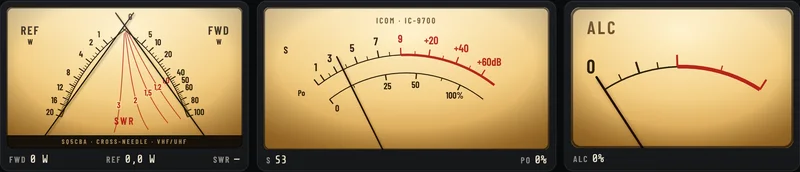
  9. Cross‑needle meter: forward (FWD) and reflected (REF) power, with SWR read at the needle intersection.
  10. S‑meter on receive and output power (Po) scale on transmit.
  11. ALC: the red zone starts where wfview sets the limit for the IC‑9700.
  12. Scope and waterfall from the radio’s spectrum analyser, with channel names above their frequencies.
Analogue meters

Needles with inertia

That’s what started the whole thing: I wanted a “cool analogue power/SWR gauge”. There are three: a cross‑needle forward/reflected power meter with SWR lines, an S‑meter combined with a power scale, and ALC.

Three analogue dial‑style meters with a cream background: a cross‑needle forward and reflected power meter with SWR lines, an S‑meter with power scale, and ALC
Cross‑needle, S‑meter and ALC while receiving. On the cross‑needle meter, SWR is read at the point where the forward (FWD) and reflected (REF) needles cross.

Raw numbers from the radio

The IC‑9700 doesn’t report watts or dB, only a 0–255 value for each meter. I took the conversion from wfview’s IC‑9700.rig radio description file. The table alongside contains the values from that file, and the panel interpolates between them.

Power in watts depends on band

The radio reports power as a percentage of maximum. The panel multiplies it by the IC‑9700’s maximum on that band: 100 W on 2 m, 75 W on 70 cm and 10 W on 23 cm.

A needle, not a bar

Each needle is a small damped spring model. When a new reading arrives, the needle moves towards it with momentum like a real meter, instead of jumping. On fast meters the spring is stiff, so the needle doesn’t lag behind the signal.

MeterRawMeaning
S‑meter0 · 120 · 241S0 · S9 · S9+64 dB
Power (Po)21 · 105 · 213 · 2555% · 30% · 100% · 120%
SWR0 · 48 · 80 · 120 · 2401.0 · 1.5 · 2 · 3 · 6
ALC0 · 120 · 2550 · zone threshold · 2× threshold
Voltage13 · 185 · 24110 V · 13.8 V · 16 V
Current121 · 24110 A · 20 A

Source: wfview, file rigs/IC-9700.rig, section Meters. I checked the panel’s numbers against this file on 10.10.2026, and they all match exactly.

Hand mic in the browser

Transmitting from the laptop with safeguards

The second request was “add frequency control and the ability to key PTT”. The first transmission from the browser went out on 8.10 at 21:32, a few minutes after that request. A network‑controlled transmitter must shut itself down if anything goes wrong, so there are several safeguards.

PTT

Five safeguards

  • PTT works only after flipping the Unlock PTT switch, and it returns to “locked” after 2 minutes;
  • it transmits only while the button or spacebar is held; the browser confirms every 250 ms that the button is still pressed;
  • if no confirmation arrives for 0.7 s, the server ends TX itself, e.g. after Wi‑Fi drops out or the tab is closed;
  • a single transmission lasts at most 180 s, regardless of the radio’s own settings;
  • commands are accepted only from the panel page, and tuning is limited to 2 m and 70 cm. I disabled 23 cm at my request.
Audio

I speak into the laptop’s microphone

  • Listen plays the radio’s audio through the laptop speaker; the browser keeps an 80–450 ms buffer so it doesn’t crackle;
  • Microphone sends my voice to the server, but it only reaches the radio while PTT is held;
  • in FM the radio takes modulation from the hand mic, not the network, so while PTT is down the service switches it to FM‑D, i.e. FM with network audio, and on release it returns to plain FM;
  • Safari doesn’t send the password when starting an audio connection, so the page first fetches a key valid for 2 minutes.
Panel control bar: tuning steps, memory channel 2 SR5U Ursus, DUP minus 0.600 MHz, tone 127.3 Hz and the PTT block with buttons Listen, Microphone and Unlock PTT
Tuning, channels, duplex, tone and PTT. Tuning steps from 100 Hz to 1 MHz, or you can enter a frequency. Memory channels are those stored in the radio, with names. The panel reads them from the IC‑9700 in the background after each connection, and ◀ ▶ moves through channels 1–99.
Panadapter and waterfall

You can see who’s transmitting before the squelch opens

On the second evening I asked what else we could add. Top of the list was the panadapter, and I replied: “add a waterfall, it’s important”. After a dozen or so minutes it was at the bottom of the RADIO tab.

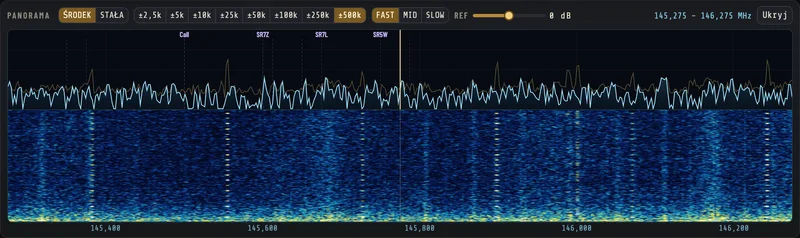
Band scope 145.275–146.275 MHz: spectrum on top, waterfall below it, channel names above their frequencies and a yellow receive frequency line
±500 kHz around 145.775 MHz, 10.10.2026. At the top the spectrum, below it the waterfall, and above it the names of the radio’s memory channels at their frequencies. The yellow line is the receive frequency. Clicking a signal tunes the radio, and the mouse wheel changes the frequency by one step.
Where the display comes from

The analyser is in the radio

  • The IC‑9700 has a built‑in spectrum analyser and sends it over the network with CI‑V command 27 00, as for wfview;
  • one frame is 475 points, each scaled 0–160, up to 25 frames per second;
  • the radio sends the spectrum only when someone is viewing the panadapter, so it doesn’t clog the network unnecessarily.
Control

Buttons like on the radio

  • CENTRE mode (around the frequency) or FIX (edge‑to‑edge);
  • span from ±2.5 kHz to ±500 kHz, speed FAST, MID, SLOW and reference level REF;
  • waterfall contrast computed from the noise median, so weak signals are visible without manual adjustment.
FT8 tab

FT8 without WSJT‑X and an AUTO button

After the channels I asked whether we could have RADIO / FT8 tabs and FT8 support. Twenty minutes later I asked for “a 100% automatic button, does everything by itself”, and two minutes after that the button was on the page.

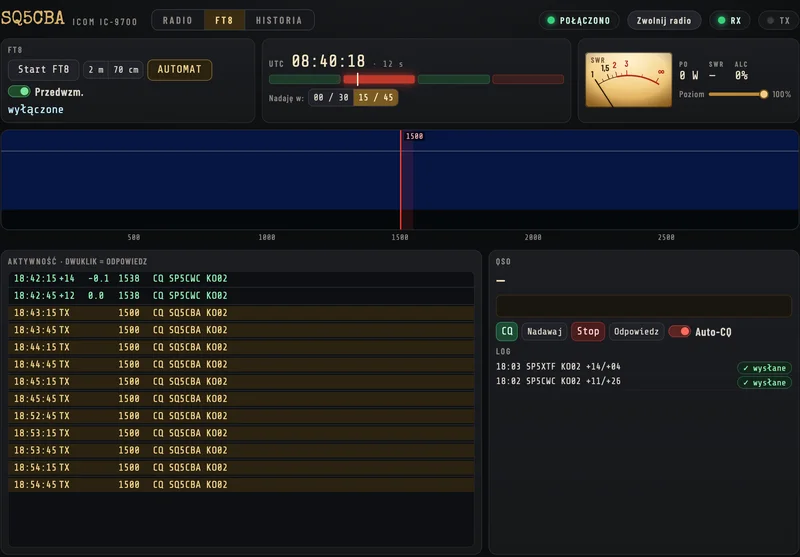
FT8 tab of the panel: Start FT8 and AUTOMATIC buttons, a UTC clock with period bar, a small SWR meter, an empty waterfall, an activity list with CQ calls and a log with QSOs with SP5XTF and SP5CWC
FT8 tab, 10.10.2026, 08:40 UTC. FT8 is off now, so the waterfall is empty. The list still shows the entries from 9 October, and on the right the log has both QSOs from the panel marked “sent” to QRZ.

What Start FT8 does

It remembers where the radio was: channel, mode, power, squelch and DATA MOD. Then it switches to VFO, simplex, 144.174 MHz in USB‑D, sets modulation from the network and squelch to zero. Stop FT8 restores everything. The saved settings live in a file, so they survive even a service restart.

Over

The server collects audio from the radio and 14.1 s after the start of each period passes it to the decoder from the ft8_lib library (Kārlis Goba, MIT licence). The waterfall at the top of the tab is computed by the browser, from the same audio. Double‑clicking a line in the list replies to that station.

Transmitting

Message tones are generated by ft8_lib, and the signal itself (GFSK) is generated by the service in NumPy directly at 16 kHz, the rate the radio accepts. The transmitter keys up 0.08 s after the start of the period, and audio starts at 0.35 s, because the radio buffers about 150 ms. Over the air the signal therefore starts just like WSJT‑X, half a second after the start of the period.

AUTO rules

  • it runs Start FT8 by itself and calls CQ every other period;
  • it first replies to stations calling me;
  • when no one is calling, it answers the strongest plain “CQ callsign locator”;
  • it skips CQ DX, CQ EU, CQ POTA, calls with a slash, and stations I already have in the log on this band;
  • after 5 failed attempts it gives up on a station for 10 minutes;
  • it switches off after 60 minutes without a QSO, after Stop, or when I close the panel.

After a QSO

The QSO goes into an ADIF log on the server and straight into my log on QRZ.com via its API. A mark appears next to the log entry: waiting, sent or error.

Works only with the panel open

Without the panel open the service doesn’t keep a session with the radio, so FT8 won’t transmit. When I close the tab, AUTO turns off, and without a QSO it switches itself off after an hour.

9.10.2026, UTCStationReports (sent / received)What happened
15:118 stations up to 177 kmfrom +11 to −16 dBPSK Reporter: our CQ is heard by SP5XMU, SP5MXG, SP5QAT, SP5QWB, SQ5TF, SP7NHS, SP7EXY and SP4FEU. The panel isn’t decoding anyone, and within 300 km no one is transmitting FT8.
15:17——Preamplifier enabled. On 2 m it had been off, because the IC‑9700 remembers it separately for each band. Noise on the S‑meter rises from 0 to 33 (raw).
18:02SP5CWC · KO02+11 / +26First QSO made via the panel: from 18:02:14 to 18:02:58 UTC, i.e. 44 s.
18:03SP5XTF · KO02+14 / +04Second, from 18:03:44 to 18:04:58 UTC. Both went to QRZ immediately and both are already confirmed.

AUTOMAT was enabled from 15:17 UTC. The frequency in the log is 144.1755 MHz: 144.174 MHz in USB plus a 1500 Hz tone.

HISTORY tab

Log from QRZ with confirmations

My last request that first evening: “also make a history of contacts and straight away an indicator of whether it was sent to QRZ”. The tab merges my log from QRZ.com with the panel’s log, so you can see every QSO, including those made on the mic on repeaters.

Top of the HISTORY tab: counters 44 QSOs and 26 confirmed, filters and two FT8 QSOs from 9 October with SP5XTF and SP5CWC, marked in QRZ and confirmed
Top of the HISTORY tab, 10.10.2026. 44 QSOs, 26 confirmed, 44 on QRZ, nothing waiting. At the top are two FT8 QSOs from the panel from 9 October. Counters, FT8/FM filter, callsign search and a QRZ refresh button.
QRZ column

Whether the entry arrived

  • on QRZ: the contact is in the QRZ.com log;
  • sent, waiting, error: send status from the panel; on error there’s a “Retry” button;
  • the panel keeps the QRZ log for 5 minutes, and after each send it fetches it afresh.
Confirmation column

Whether the other side has confirmed

  • confirmed: the other station has this QSO in their log and QRZ has matched it;
  • request sent: QRZ has asked the other side to confirm;
  • the panel log and the QRZ entry join into one row when the callsign, band and time match within 30 minutes.
How it was built

My requests and what came of them

There was no design or feature list. I wrote to Claude Code in Polish, as if to a mate, and he added code, uploaded it to the server and tested it. Times are Polish time, from the chat log and the service log.

Thursday, 8 October

  1. I ask whether the IC‑9700 could be programmed so I’d have an app in the browser. An hour earlier we’d tried FT8 via WSJT‑X: 6 local stations in the decodes, but no QSOs.
  2. Decision: a separate subpage on my server, and to start with “a nice analogue power/SWR meter”.
  3. The first version was an FT8 demo, but I wanted something else: it should show the radio’s current settings, and the meters need to be smaller because they don’t fit.
  4. Live panel: display, settings tiles, three meters. Everything fits on a 1280 × 720 screen.
  5. Please add tuning and the hand mic.
  6. First transmission from the browser, then audio both ways and the laptop mic.
  7. Memory channels: ◀ ▶ buttons and band selection. The service reads the channels from the radio along with their names.
  8. RADIO / FT8 tabs and FT8 operation without WSJT‑X.
  9. “A 100% automatic button, it does everything itself”. Two minutes later AUTOMAT is on the page.
  10. Screenshot: FT8 is transmitting at 0 W. The cause is DATA MOD set to ACC. At 22:16 the radio is putting out power.
  11. QSO history with a tick for whether the entry went to QRZ. At 22:23 the HISTORY tab is ready.
  12. Only 16 W on FT8. Power at 20% was left over from FM, so Start FT8 now stores the power and Stop restores it.
  13. “That’s it for today, turn the radio off”. Stop FT8 restored the SR5UR channel, and the radio powered down via a network command.

Friday, 9 October

  1. “I can’t decode anyone on FT8”. Eight stations hear our CQ, but within 300 km no one is transmitting, and the preamp on 2 m is off.
  2. Preamp enabled and a switch in two places on the panel.
  3. Four reports from Safari in 7 minutes: the channel list won’t expand, after PTT nothing works, spacebar scrolls the page, the PTT block grows.
  4. AUTOMAT makes its first QSO with SP5CWC, and a minute later with SP5XTF. Both go straight to QRZ.
  5. “FT8 isn’t transmitting again, and everything is on”. Two bugs: packet counter past 65,535 and stale DATA MOD. Fixed at 20:13.
  6. The Stop button doesn’t work: after a service restart Safari stopped receiving state. The page now reconnects by itself.
  7. “Do a waterfall, it’s important”. After a dozen or so minutes there’s a spectrum display, and at my request it lands right at the bottom.
  8. Only 2 m and 70 cm — “don’t enable 23 cm on my radio”.
  9. “I click AUTOMAT and it doesn’t work”. Safari was losing clicks. Fixed at 20:45.
my requestwhat Claude Code dida slip-up and a fix
AI assistant at the radio

How Claude Code worked

Claude Code worked in the terminal on my Mac and connected to the server over SSH. Next to it is a fragment from a real session: I reported with a screenshot that FT8 was transmitting at 0 W, and 20 minutes later that it was only 16 W.

Division of roles

The idea, decisions and hands‑on testing at the radio were mine. I’m the licensed operator and I’m responsible for every transmission, including those from AUTOMAT. Claude Code wrote all the service and page code, uploaded it to the server and checked it worked.

How he tested it

  • before changing a setting on the radio he read it, and after the change he read it again to confirm;
  • AUTOMAT was first exercised on invented decodes: silence, only directed CQ, two ordinary CQ, and it picked the stronger of them;
  • the page layout was measured in a test browser at several resolutions, e.g. whether ALC didn’t spill out of its frame;
  • he restarted the service during an FT8 receive period so as not to interrupt a transmission, and before every change he made a copy of the files;
  • he honestly wrote what he hadn’t checked. Most often it was “I haven’t tested this in Safari”, because he only had Chrome.

What he can’t do

He can’t see the radio or the antenna and he can’t hear the band. I found the Safari bugs by clicking around, and he hunted the cause in the code and logs. It was PSK Reporter that finally told him that on 2 m almost no one was transmitting FT8.

claude · terminal · 8.10.2026, 22:13–22:31
# 22:12, me: “but why is TX 0?” (+ screenshot)
read from the radio the modulation source menu (1A 05 0110–0116)
0114 LAN MOD Level: 0128 -> 50%
0115 DATA OFF MOD : 02 MIC,ACC
0116 DATA MOD     : 01 ACC
radio: 144174000 USB data True
# FT8 is in USB‑D, and data modulation is set to come from the ACC socket, not the network
Start FT8 switches DATA MOD to LAN, Stop restores the previous setting
before: DATA MOD 01 | power 51 144174000 USB True
after start: DATA MOD 05 USB True
22:15:58 CI-V write: 1A05011605
22:16:15 FT8 TX: CQ SQ5CBA KO02
reads in TX: 48 | Po raw max 70 = 16% | ALC raw 80 | SWR raw 17
# 22:28, me: “and why do I only have 16 W when I’ve got power set to 100”
read the set power and measure Po on the next FT8 transmission
set power (14 0A): raw 51 = 20%
in TX (38 reads): Po raw median 70 (= 16%)
set power to 100% and measure the next transmission
set power now: raw 255 = 100%
in TX (155 reads): Po median 213 (= 100 W) | ALC 111/120 | SWR raw 32
Start FT8 also remembers power; service restart between periods, AUTOMAT restored
remembered: {'f': 439300000, 'tryb_bazowy': 'FM', 'dup': 'DUP−', 'sql': 67,
  'kanal': {'nazwa': 'SR5UR Ursus'}, 'data_mod': '01', 'moc': 51}
# 22:31, me: “that’s it for today, turn the radio off”
Stop FT8 and check the radio returned to the pre‑FT8 settings
after Stop FT8: 439300000 FM DUP− 7600000 TONE 127.3 | power 51 sql 67 | DATA MOD 01 | channel ['SR5UR Ursus'] | TX False

The terminal shows the descriptions of the commands Claude Code issued and their real results. I’ve omitted the long scripts. Comments starting with “#” are mine.

What we tripped over

Ten pitfalls from two evenings

Roughly half were about the radio, half about the browser. I reported each with a one‑liner like “I click AUTOMAT and it doesn’t work”, and Claude Code looked for the cause in the service logs and the code.

  1. FT8 transmitting at 0 W

    The radio keyed up but there was no power. In the DATA MOD menu (the modulation source for digital modes) it was ACC instead of LAN, so audio from the network wasn’t reaching the modulator.

    → Start FT8 always sets DATA MOD = LAN, and Stop restores the previous setting
  2. FM power carries over to FT8

    On the repeater I have 20% power and FT8 wasn’t changing that. It came out 16 W, and later in the terminal 100 W with ALC 111 out of 120.

    → Start FT8 remembers the power and Stop restores it
  3. The decoder is silent

    The IC‑9700 remembers the preamp separately for each band: it was on at 70 cm and off at 2 m. On top of that, almost no one in the area is transmitting FT8, so there was nothing to decode.

    → a preamp toggle in the RADIO and FT8 tabs
  4. Session dies after a few hours

    The CI‑V packet number is 16‑bit. After 65,535 packets the program couldn’t write the next number and would drop the session, while the panel still showed “connected” with stale state.

    → counter rolls over to zero after 65,535
  5. Noise instead of audio

    Audio samples from the radio have bytes in little‑endian order. Read the other way round they produce pure noise.

    → test both byte orders on a real signal
  6. Channel list doesn’t expand

    The panel refreshes about 20 times a second and each time it set the selected list item. Safari therefore closed the expanded list.

    → after clicking the list the panel leaves it alone for 10 s
  7. After PTT the whole page is dead

    The PTT button “grabbed” the mouse and Safari didn’t always release that lock. Every subsequent click hit PTT.

    → releasing the mouse anywhere on the page ends transmission
  8. Safari drops clicks

    The label on the AUTOMAT button was being overwritten 20 times a second with the same text. WebKit treated it as a new element and discarded the click if the swap fell between mouse down and up.

    → identical text is no longer re‑written
  9. The button does the opposite

    After a service restart Safari permanently closed the state stream. The page showed stale state and AUTOMAT sent “on” instead of “off”.

    → auto‑reconnect and a watchdog: 15 s without data = new connection
  10. Radio busy

    The IC‑9700 accepts one session over the network. With the panel open, wfview and WSJT‑X on the Mac won’t connect.

    → “Release radio” button and disconnect 20 s after closing the tab
Sources

What it runs on

  1. wfview: open‑source program for controlling Icom radios over the network, project site · wfview.org
  2. wfview: source code, including rigs/IC-9700.rig (CI‑V commands and meter calibration) · gitlab.com
  3. K. Goba, ft8_lib: FT8 library in C (decoder decode_ft8 and generator gen_ft8), MIT licence · github.com
  4. Icom IC‑9700: product page, manual and CI‑V command description (CI‑V Reference Guide) · www.icomjapan.com
  5. QRZ.com: Logbook API · www.qrz.com
  6. PSK Reporter: reception reports of SQ5CBA from 9.10.2026 · pskreporter.info
  7. Claude Code: Anthropic documentation · code.claude.com
  8. My own data: a transcript of my conversation with Claude Code from 8 and 9.10.2026, the panel service log, the panel’s ADIF log and screenshots from 10.10.2026

I’m not publishing the panel’s code: it contains access credentials for the radio and for my QRZ log. The screenshots are from the real panel, and I’ve only hidden its address in the footer.

Next step

Got a radio with LAN? Start with wfview

First check the radio in wfview: if it connects, you can do almost everything with it over the network. Your own panel is then just a matter of patience, yours or an AI assistant’s. If you hear me on FT8 on 144.174, let me know in the guestbook.