Home  /  D-STAR from scratch

Guide · digital mode

D-STAR from scratch

The first digital standard created specifically for radio amateurs — and the only one where the address is your callsign, not a number. Below is everything you need to get going: callsign registration, the four fields in the radio, DR mode, reflectors, a hotspot and your first QSO. No fluff and not just a translation from English.

GMSK · 4800 bit/s voice 2400 + 1200 FEC 61 repeaters in Poland Icom · Kenwood
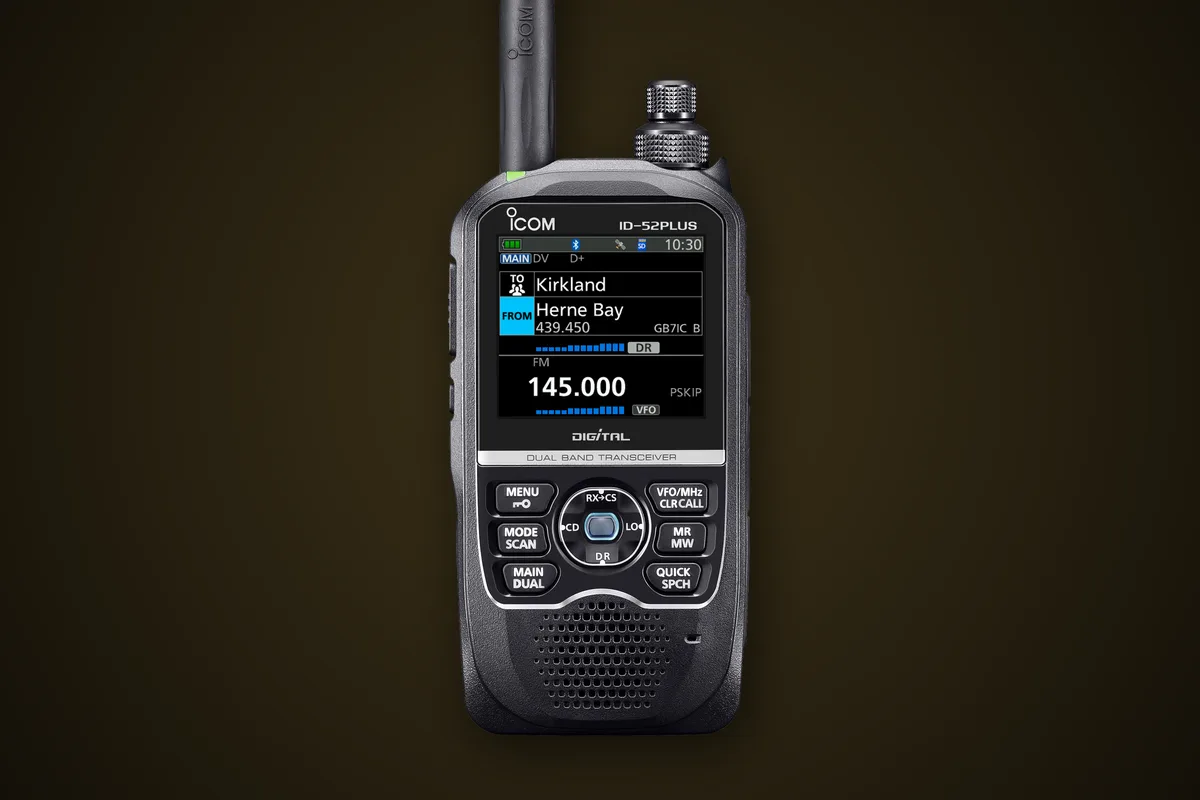
Icom ID-52E PLUS — D-STAR handheld transceiver with the DR mode screen visible (TO and FROM fields)
ID-52E PLUS · DR mode on screen: TO / FROM
Basics

What exactly is D-STAR

Digital voice, background data and a network that knows where you are — all within a standard FM channel.

An amateur standard, not a corporate invention

D-STAR (Digital Smart Technologies for Amateur Radio) was developed in the early 2000s by the Japanese amateur radio association JARL — as an open specification for amateurs rather than an adaptation of a commercial system. The hardware is built mainly by Icom, with Kenwood joining along the way. It’s the oldest of the three digital standards you’ll find on repeaters today.

Technically: GMSK modulation, 4800 bit/s in a 12.5 kHz channel. That stream is split into two parts sent simultaneously:

  • 3600 bit/s of voice — 2400 bit/s AMBE codec plus 1200 bit/s error correction
  • 1200 bit/s of data — GPS position, short text, station description, header with your callsign
  • DD mode — 128 kbit/s of pure data, but only on 23 cm (supported by e.g. the IC-9700)

The data rides alongside the voice throughout the transmission — which is why you see the caller’s callsign and QTH on the display before they finish their first sentence.
A mast with antennas against a sunset — a typical repeater location a repeater lives on a high site
Difference

What D-STAR does differently

Three things you won’t get on FM — and one you need to get used to.

01

The address is the callsign

You enter SP9XYZ and the network routes the transmission to wherever that station last checked in — even on the other side of the world. No ID numbers or talkgroups.

02

Data alongside voice

GPS position in D-PRS format, short messages, station description — all go in parallel with the conversation, with no mode switching.

03

Clean or nothing

There’s no hiss or hum. The signal is crystal‑clear right up to the edge of coverage, then it suddenly breaks up into “R2D2” and vanishes. It’s a completely different sense of distance from FM.

Where to listen

D-STAR in Poland

According to my repeater database there are 61 repeaters with D-STAR in Poland — of which 59 operate on 70 cm and only 2 on 2 m. Twenty‑five of them are multisystem machines, supporting D-STAR alongside DMR or C4FM.

CallsignOutputInputQTHLocatorAlso
SR5WC438.600431.000Moszna-Parcela · EC Pruszków II chimneyKO02IE—
SR5ZQ439.250431.650SkierniewiceKO02HAC4FM
SR5RK438.750431.150Kozłowiec · RTCN PrzysuchaKO01GIFM
SR5UVR438.525430.925RadomKO01NJ—
SR5OK439.2625431.6625KadzidłoKO03RFDMR, Echolink
SR5UOS438.9125431.3125OstrołękaKO03SBDMR
SR8UVB439.4125431.8125Chotycze · RTCN ŁosiceKO12JE—
SR4UBI439.425431.825BiałystokKO13NDDMR
!

All Polish D-STAR repeaters on 70 cm have a −7.6 MHz shift — calculate the input by subtracting 7.6 MHz from the output. From my QTH in Mokotów the nearest is SR5WC (438.600 MHz) on the chimney of the CHP plant near Pruszków, about 20 km to the west. You’ll find the full, filtered list in the repeater database.

Step by step

Registering your callsign

This is the only bit of formality in D-STAR — and the number‑one reason why for beginners “nothing works”. It’s free, you do it once in your life and only at one gateway in the world.

1

Check you’re not already in there

It happens that a club mate registered the callsign, or you did it years ago. A double registration in two gateways will effectively stop things working, so start by checking the registration lookup.

dstar.info/query.html · pistar.uk/d-star_regcheck.php
2

Pick one gateway and register

You register with any D-STAR gateway operator — easiest with a Polish one (Radom also runs the national reflector) or in the central system. Enter your callsign in UPPER CASE, choose your own password.

regist.dstargateway.org · dstar.radom.pl
3

Wait for approval

An admin manually checks that the callsign really belongs to you — this can take from a few hours to a few days. Until then your radio will get on the air, but the gateway won’t pass you any further.

4

Add a “terminal” — the second, often forgotten step

Registering the callsign alone isn’t enough. In the panel you must also add at least one device: an entry with a blank suffix (a space) for normal operation via a repeater, and if you want to use Terminal/Access Point mode on the ID-52 — an extra entry with a letter, e.g. A.

SQ5CBA  → operation via repeater  ·  SQ5CBA A  → terminal / AP
Four fields

What to enter in the radio

Classic D-STAR is four fields of eight characters. Newer radios fill them in for you in DR mode, but it’s worth understanding what’s in there — because when something doesn’t work, this is exactly where you look.

FieldWhat it meansExample for SR5WC
MYYour callsign. Optionally with a four-character suffix describing the radio.SQ5CBA  /  SQ5CBA / ID52
URWhom you’re calling. For a general call it’s always the same.CQCQCQ
RPT1The repeater you transmit through, plus the module letter in the eighth position.SR5WC  B
RPT2The internet gateway of the same repeater — letter G in the eighth position.SR5WC  G
8

Fields are exactly eight characters, and the module letter is always in the eighth position — the callsign SR5WC has five letters, so you add two spaces and only then put B or G. Module letters are conventional: A is 23 cm, B — 70 cm, C — 2 m. Miscounted spaces are the most common beginner’s mistake and a typical cause of the RPT? reply.

Easier

DR mode — no more counting spaces

how it works

FROM and TO

In DR mode (D-STAR Repeater) you no longer see RPT1 and RPT2. You only choose FROM — which repeater you transmit through — and TO: whether that’s a general call (CQCQCQ), a specific reflector, or a mate’s callsign. The radio builds the four fields from that by itself. That exact screen is shown in the photo in this page’s header.

requirement

Current repeater list

DR mode works off a loaded list. Icom publishes ready-made CSV files for Europe — you load them from a microSD card or with the radio’s configuration program. Do this before your first time on air, because the out‑of‑the‑box list can be several years old. A GPS‑equipped radio (like ID-52) will then suggest the nearest repeater automatically.

Out to the world

Reflectors — how to link

A reflector is a server that many repeaters and hotspots connect to at once. Anything that goes into its module comes out at all connected ones — that’s why you’ll suddenly hear a station from Spain on the local 70 cm.

Reflector familiesREF · XRF · DCS · XLX Historically three mutually incompatible systems emerged: REF (dPlus), XRF (DExtra) and DCS. Today most servers are XLX, which emulates all three at once — you’ll therefore see the same reflector under three names.
Polish reflectorXLX132 The national multi‑reflector run by the Radom team; to the radio it also appears as REF132 / XRF132 / DCS132. Fun fact: its C module is permanently bridged to the Polish DMR network — when you speak via D‑STAR, DMR users hear you as well.
Connectingmanually via the UR field In DR mode you pick the reflector from the list in the TO field and that’s it. Manually: in UR you enter the reflector name, the module letter and L for link — e.g. XLX132CL. To disconnect it’s seven spaces and the letter U.
·−

Before you link a repeater to a reflector — listen. You’re linking it for all users, not just for yourself, and you can easily plug half the region into someone else’s conversation. Good practice is to check where the repeater is already connected, and to disconnect after yourself if you changed the link.

No repeater in range

Hotspot — or your phone instead

the classic way

MMDVM, Pi-Star, openSPOT

A hotspot is a tiny few‑milliwatt transmitter on your desk that turns your radio into an internet gateway. The most popular are an MMDVM board on a Raspberry Pi with Pi-Star or WPSD software, or a turnkey openSPOT. A single hotspot handles D‑STAR, DMR and C4FM — you switch between networks in your browser.

on the ID-52

Terminal mode and Access Point mode

The Icom ID-52 can do without a hotspot: over Bluetooth it connects to a phone running the RS-MS3A app and goes online via its data connection. In terminal mode the radio doesn’t transmit RF at all — it goes straight to the internet; in AP mode it turns into a mini‑hotspot for other radios. The PLUS version additionally lets you keep the terminal active in parallel with normal on‑band operation.

i

Terminal and AP modes require registration with the terminal letter (that second step from the section on registration). Without it the radio will connect to the phone, but the network will reject the transmission.

Practice

First QSO on D-STAR

Technically nothing changes compared with FM — only the rhythm changes.

1

Listen first

Set the repeater and leave the radio for a dozen or so minutes. With every transmission you’ll see the caller’s callsign and description on the display — it’s the quickest way to figure out who’s active nearby.

2

Wait half a second after PTT

At the start of a transmission a header with your callsign and synchronisation goes out. If you start speaking immediately, the first word will be lost. Press, count “one” in your head, then speak.

3

Call

Keep it short and natural. If the repeater is linked to a reflector, it’s worth saying where you are — on the other end there might be someone in a completely different country.

“SQ5CBA calling on D-STAR, anyone copy?”
4

Leave gaps between overs

Between you and the other station there’s a repeater, a gateway and sometimes a reflector — the chain needs a fraction of a second to switch. A two‑second pause before replying isn’t politeness, it’s a technical requirement.

5

Clean up after yourself

If during the QSO you changed the repeater’s link to a reflector, when you finish either disconnect or restore what was there. The next user shouldn’t have to guess where you’ve suddenly sent them.

Diagnostics

When it doesn’t work

D-STAR answers with short messages on the display. Four of them explain most problems.

RPT?radio message The repeater heard you, but the repeater callsign in RPT1/RPT2 doesn’t match — most often the spaces are miscounted or the module letter is wrong. Go back to the four fields and check them again.
UR?radio message The repeater and its gateway are fine, but the route wasn’t set up: an unregistered callsign, a missing ‘terminal’, a typo in UR, or a reflector that doesn’t exist.
First word cut offat the other end A classic at the start — you’re speaking too soon after pressing PTT. Half a second’s pause fixes it for good.
Voice like R2D2choppy, metallic That’s the edge of coverage. Digital doesn’t hiss — it just breaks up and drops out. Raise the antenna, change location or pick a nearer repeater; turning up the power helps here less than you’d think.
Cheat sheet

Mini-glossary

DV
Digital Voice — the basic D-STAR mode: voice plus data
DD
Digital Data — 128 kbit/s of pure data, 23 cm only
AMBE
codec converting voice to 2,400 bit/s
GMSK
modulation used in D-STAR, 4,800 bit/s
DR
radio mode where you choose FROM and TO instead of four fields
RPT1 / RPT2
the repeater and its internet gateway
Module
letter of the repeater band: A – 23 cm, B – 70 cm, C – 2 m
D-PRS
GPS position transmitted in the background during transmission
Reflector
a server linking many repeaters into one conversation
XLX
a modern reflector emulating REF, XRF and DCS all at once
Hotspot
a miniature desktop transmitter-gateway to the internet
Terminal Mode
operating via a phone, without transmitting over the air at all
Next step

And what about C4FM and DMR?

D-STAR is one of the three digital systems you’ll encounter on Polish repeaters. I’ve compared them side by side — modulation, codec, paperwork, equipment and real-world availability in SP.