Home  /  Guide  /  FT8 on 2 m

Guide · digital modes · QSO report

FT8 on 2 m:
first QSO step by step

On 5 October 2026 at 19:57 UTC I made my first FT8 QSO from my IC‑9700: with SP5EBH, on 144.174 MHz, reports +13 and +12 dB. The radio was in the room and didn’t have a single audio cable connected to the computer. Everything went over the network. At the radio I was helped by Claude Code, an AI assistant running in the terminal. I’m showing how FT8 works, what this QSO looked like second by second, who heard me and where we tripped up.

144.174 MHz 15 s periods 8 tones · 50 Hz IC‑9700 over LAN WSJT‑X 3.0.1 Claude Code
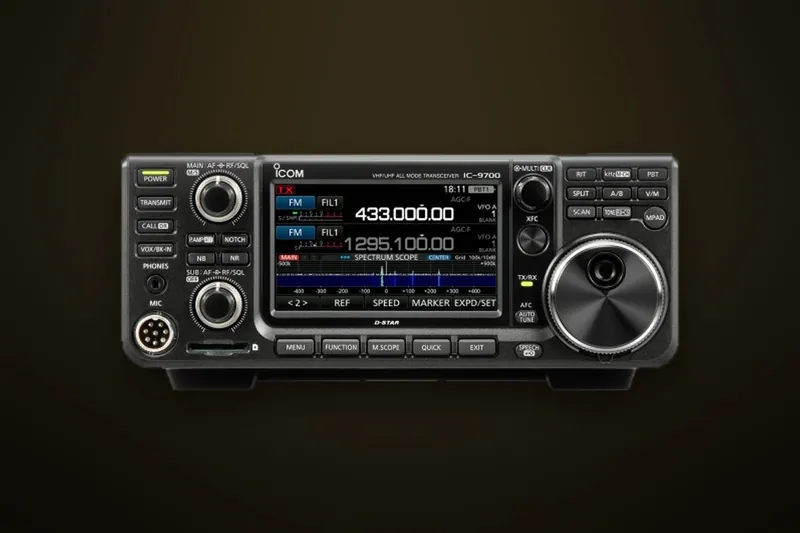
Icom IC‑9700, transceiver for 2 m, 70 cm and 23 cm, on a dark background IC‑9700 · 2 m / 70 cm / 23 cm · Icom product photo
QSO second by second

Three minutes, six messages

Below I reproduce the real log from WSJT‑X’s ALL.TXT file. The tones on the waterfall are exactly those our radios sent. They were calculated by the ft8code program from the WSJT‑X suite.

19:55:15 UTC · period odd
SP5EBH ~1000 HzSQ5CBA 1540 Hz
80010001200140016001800 Hz
  WSJT‑X · FT8 · 144.174 MHz

    Yellow lines are my transmissions, red are messages addressed to me, as in WSJT‑X. Simplification: in the real program you don’t see your own signal on the waterfall, because the receiver is muted during transmit. Here I draw both so the order is visible.

    UTCWhoMessageWhat it means
    19:55:45meCQ SQ5CBA KO02General call: ‘CQ’, my callsign and locator (first four characters, a square about 110 × 140 km).
    19:56:00SP5EBHSQ5CBA SP5EBH KO02Reply: first the called station’s callsign, then your own and the locator. I received him at +13 dB.
    19:57:15meSP5EBH SQ5CBA +13Report: that’s how strongly I hear him. The number is the signal‑to‑noise ratio in dB in a 2.5 kHz bandwidth.
    19:57:30SP5EBHSQ5CBA SP5EBH R+12‘R’ means your report was received. +12 dB is my signal at his end.
    19:57:45meSP5EBH SQ5CBA RRRAll copied. Callsigns, reports and acknowledgements have been exchanged, so the QSO is complete.
    19:58:00SP5EBHSQ5CBA SP5EBH 73Greetings. 11 s later WSJT‑X logged the QSO.

    Instead of RRR many stations send RR73 straight away, i.e. acknowledgement and greetings in one message. The WSJT‑X manual advises using it only when repeats are unlikely to be needed. By the IARU definition a QSO is valid when both operators have identified, exchanged reports and received an acknowledgement. The full sequence from CQ to 73 is six periods, i.e. 90 s.

    What it actually is

    A mode that hears below the noise

    FT8 is a digital mode for QSOs with very weak signals. Stations exchange short, standard messages in 15‑second periods: callsign, locator, report. It’s not for a chat, but it makes QSOs happen where nobody would hear each other on voice.

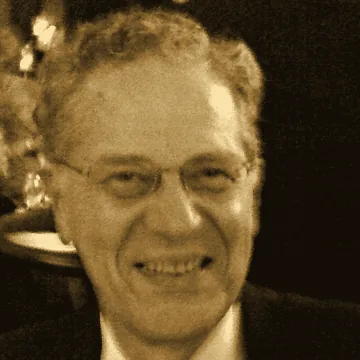
    Portrait of Joe Taylor K1JT, smiling, with glasses, sepia‑tonedJoe Taylor K1JT, 2008
    photo: Betsy Devine, CC BY‑SA 3.0, crop, sepia

    Franke and Taylor, eight tones

    FT8 was developed by Steve Franke K9AN and Joe Taylor K1JT. The name is short for ‘Franke and Taylor, 8‑FSK modulation’. The first version landed in the WSJT‑X program in July 2017 (release 1.8.0‑rc1). That same year, though FT8 had only been around for half a year, 4.8 million out of 32 million QSOs were logged in Club Log using it, i.e. 15%.

    Joe Taylor is a radio astronomer, winner of the 1993 Nobel Prize in Physics, awarded together with Russell Hulse for discovering a new type of pulsar: the first binary pulsar, PSR 1913+16. He has published the WSJT programs (‘Weak Signal communication by K1JT’) since 2001.

    FT8 today

    Since 10 December 2018 (WSJT‑X 2.0) each message carries 77 bits of payload, and older versions of the program will not interoperate with newer ones. Since version 2.1 (July 2019) the transitions between tones are smoothed with a Gaussian filter to make the signal narrower.

    In the week ending 5 October 2026 FT8 accounts for 71% of QSOs uploaded to Club Log. I use WSJT‑X 3.0.1 from May 2026. June brought version 3.0.2, and 3.2 is already in testing.

    WSJT‑X is free software under the GPLv3. The authors deliberately do not allow fully automatic QSOs: each one must be started by a human.
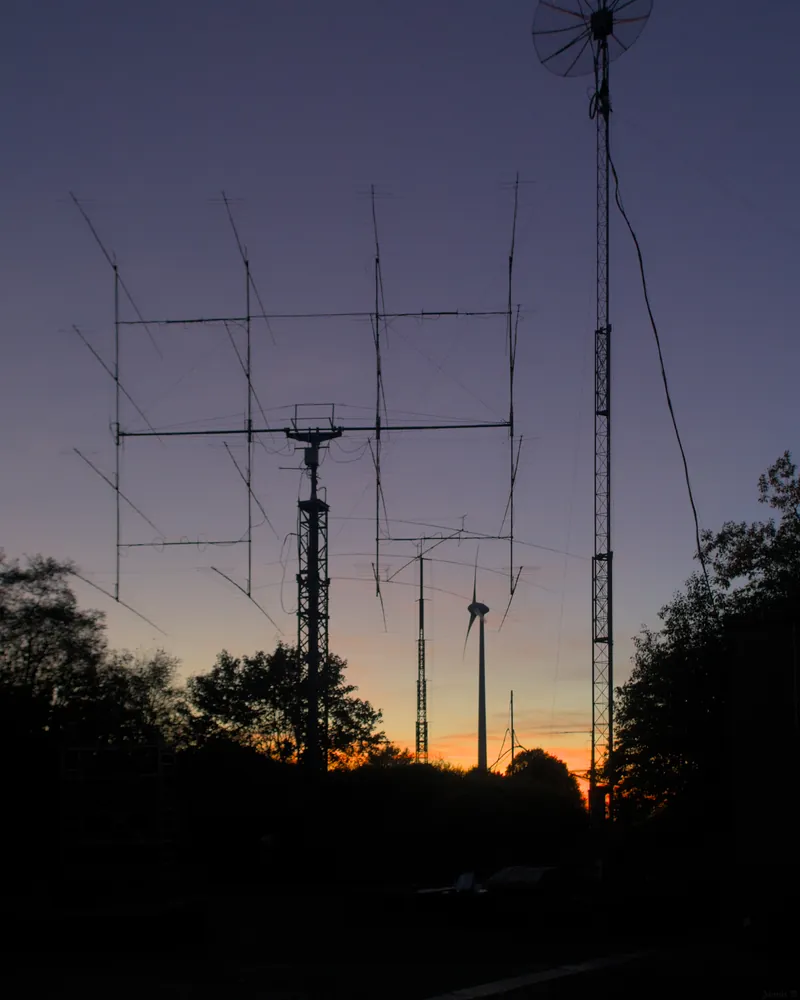
    Silhouette of a mast with a stack of long Yagi antennas for EME contacts against a purple dusk sky EME antennas at dusk · photo: Jannis, CC BY‑SA 2.0, crop
    sensitivity−21 dB

    Hears below the noise

    This is the decoding threshold given in the WSJT‑X manual, referenced to a 2500 Hz bandwidth. On the waterfall you can see a signal from about −26 dB, but by ear it doesn’t become audible until about −15 dB.

    bandwidth50 Hz

    As narrow as CW

    Eight tones spaced every 6.25 Hz. Within a normal SSB channel passband you can fit dozens of signals at once, and the decoder separates them automatically, even two or three on the same frequency.

    period15 s

    Transmission period

    Transmission starts 0.5 s after the start of the period and lasts 12.64 s. That leaves just under 2 s for decoding and deciding what to send next.

    Anatomy of a signal

    My ‘CQ SQ5CBA KO02’ as 79 tones

    This is what a single FT8 message looks like inside. It’s not a textbook example, but my own call encoded by ft8code. Click and listen to how it sounds through the speaker.

    base tone 1540 Hz, as in my QSO
    FT8 signal anatomy: the message CQ SQ5CBA KO02 as 79 tones Plot of 79 symbols over 12.64 seconds. Three 7‑symbol Costas synchronisation blocks at the start, middle and end, with 58 data symbols between them. Below, 174 bits: 77 message bits, 14 CRC bits and 83 parity bits. Costas 7×7 29 data symbols Costas 7×7 29 data symbols Costas 7×7 +0.00 Hz 1 2 3 4 5 6 +43.75 Hz tone 0 s 2 s 4 s 6 s 8 s 10 s 12.64 s 174 bits after encoding (LDPC code 174,91) 77 message bits: “CQ SQ5CBA KO02” CRC 14 83 parity bits (error correction) 174 bits ÷ 3 bits per tone = 58 data symbols. Plus 21 synchronisation symbols = 79 tones of 0.16 s each. 8 tones spaced every 6.25 Hz: the whole signal occupies about 50 Hz. In a 2.5 kHz passband you can fit dozens of stations at once.

    ← scroll sideways to see it all →

    79 tones of 0.16 s. The three bright blocks are 7×7 Costas arrays (tones 3‑1‑4‑0‑6‑5‑2). From them the decoder locks onto the signal in time and frequency. Between them are 58 data symbols of 3 bits each. The 77 content bits get 14 bits of CRC checksum and 83 bits of LDPC coding (174,91), which corrects errors. The run of zeros at the start of the data is the encoded word “CQ”. The button’s sound is generated in your browser from the same tones, without noise.
    15 seconds

    The clock is part of the radio

    All FT8 stations worldwide transmit in the same 15‑second periods, counted from the top of the UTC minute. One side of a QSO transmits in the even periods (:00 and :30), the other in the odd (:15 and :45). The WSJT‑X manual requires your clock to agree with UTC to within ±1 s.

    Live, by your computer’s clock

    Counting…

    –

    to the end of the current period

    odd periods (:15, :45): I was transmittingeven (:00, :30): SP5EBHdecoding pause
    DT, i.e. time offset

    0.3 s at SP5EBH’s end

    • every decode line has a DT column: how much earlier or later the signal arrived, in seconds
    • according to ZL2IFB’s guide, an average DT between −1 and +1 s is fine in practice
    • the decoder searches within a ±2.5 s window, but that doesn’t mean you can be that late
    • my first CQ went out 3 s late and still decoded: according to the FT8 authors’ simulations (signal −10 dB, decoding without AP), transmissions delayed by up to about 5 s will still decode
    My clock

    +0.17 s

    • macOS sets the time automatically from Apple’s server: System Settings › General › Date & Time
    • before the session Claude Code just checked the offset with the sntp command and didn’t change anything
    • the WSJT‑X manual advises against programs that step‑correct the clock: it should slew smoothly
    • on Windows the manual recommends e.g. Meinberg NTP Client; you can compare your clock with the UTC clock
    Where to listen

    144.174 MHz and the other bands

    FT8 doesn’t have its own frequencies in the IARU band plan. The Region 1 plan deliberately doesn’t assign them to specific digital modes. Everyone uses the ones that WSJT‑X has as defaults. On 2 m that’s 144.174 MHz, within 144.150–144.400 MHz, the section for CW, SSB and digital modes.

    BandFT8 (USB, dial frequency)Notes
    2 m144.174 MHzFT4 144.170 · Q65 144.180 · MSK144 (meteors) 144.360
    70 cm432.174 MHzMSK144 432.360
    23 cm1296.174 MHzThe IC‑9700 also covers this band
    6 m50.313 MHz50.323 is described in WSJT‑X as “intercontinental”
    4 m70.154 MHz
    HF1.840 · 3.573 · 7.074 · 10.136
    14.074 · 18.100 · 21.074
    24.915 · 28.074 MHz
    from 160 to 10 m; on 20 m (14.074) the highest number of monitoring stations on PSK Reporter: 1911 at the time of my screenshot

    These are USB dial frequencies. The signal sits higher by the audio tone: with a 1540 Hz tone mine was at 144.17554 MHz. Source: the default frequency table in the WSJT‑X code. An old 2011 band plan, still published on the PK‑UKF site, listed 144.160–144.180 MHz for digital modes on 2 m. The current IARU VHF handbook (version 10.03) no longer has it. Full plan: IARU band plan.

    My setup

    IC‑9700 without an audio cable

    Normally you connect the radio to the computer with a USB cable and that’s enough. In my case the radio is in a different place from the computer, so everything goes over the network: control and audio both ways.

    FT8 signal path at SQ5CBA: IC‑9700 over the network, wfview, WSJT‑X and Claude Code The IC‑9700 connects via a Wi‑Fi bridge to the Mac. wfview receives audio and control from the radio over UDP, exposes CAT control for WSJT‑X on port 4533, and passes audio via BlackHole virtual devices. Claude Code runs in a terminal alongside: it sets the radio with CI‑V commands, checks the clock, audio level and log. MacBook (macOS) Radio on the desk Icom IC-9700 144.174 MHz · USB-D DATA MOD = LAN SQL 0 · single receiver Wi‑Fi bridge the radio has no Wi‑Fi, has a LAN port UDP (Icom)50001 control50002 CI-V50003 audiosign-in:username and passwordfrom the radio’s menu wfview bridge to the radio rigctld :4533 waterfall off WSJT-X 3.0.1 FT8 encoder and decoder CAT: Hamlib NET PTT via CAT BlackHole 16ch audio from the radio (RX) BlackHole 2ch audio to the radio (TX) Claude Code (terminal) custom CI-V client in Python: reading from and configuring the radio sntp: clock (+0.17 s) · ffmpeg: audio level (−50 dBFS) launching wfview and WSJT-X · clicks in the windows view ALL.TXT · PSK Reporter · ADIF logging Internet PSK Reporter QRZ.com · ADIF CAT RX TX spots CI-V audio from the radio audio to the radio control (CAT) Claude Code 5000x are the default portsfor Icom network control.

    ← scroll sideways to see it all →

    My signal chain. The IC‑9700 has a LAN port, and with “Network Control” enabled it streams audio over the network and accepts commands. wfview, a free GPLv3‑licensed program (by W6EL and M0VSE), connects to the radio and pretends to be Hamlib’s rigctld for WSJT‑X, on port 4533. Audio goes via two virtual BlackHole sound cards. A cable would be simpler: the radio has a built‑in USB audio interface that WSJT‑X can see directly.
    WhereSettingWhy
    RadioNetwork Control = ON, network username and passwordwithout this the radio won’t allow wfview to connect
    RadioDATA MOD = LANaudio to the modulator comes from the network
    RadioVFO, simplex, USB‑D, single receiver (MAIN)CAT and audio refer to the same receiver, with no offset
    RadioSQL 0, power 35% (about 37 W)continuous audio; FT8 doesn’t need full power
    wfviewrigctld on, port 4533WSJT‑X controls the radio through this port
    wfviewoutput: BlackHole 16ch, input: BlackHole 2chseparate cards for receive and transmit
    wfviewwaterfall offon macOS 26 it crashed the program when connecting
    WSJT‑XRadio: Hamlib NET rigctl, 127.0.0.1:4533, PTT: CAT, Mode: Data/Pkt, Split: Nonechoosing “Icom IC‑9700” looks for the radio on a serial port
    WSJT‑XAudio: input BlackHole 16ch (Left channel), output BlackHole 2ch“Mono” averaged 16 channels
    WSJT‑XAuto Seq, “CQ: First”, Tx watchdog 30 minanswers callers without clicking
    macOStime set automatically (time.apple.com); check: sntp showed +0.17 speriods must match UTC
    Real screenshot

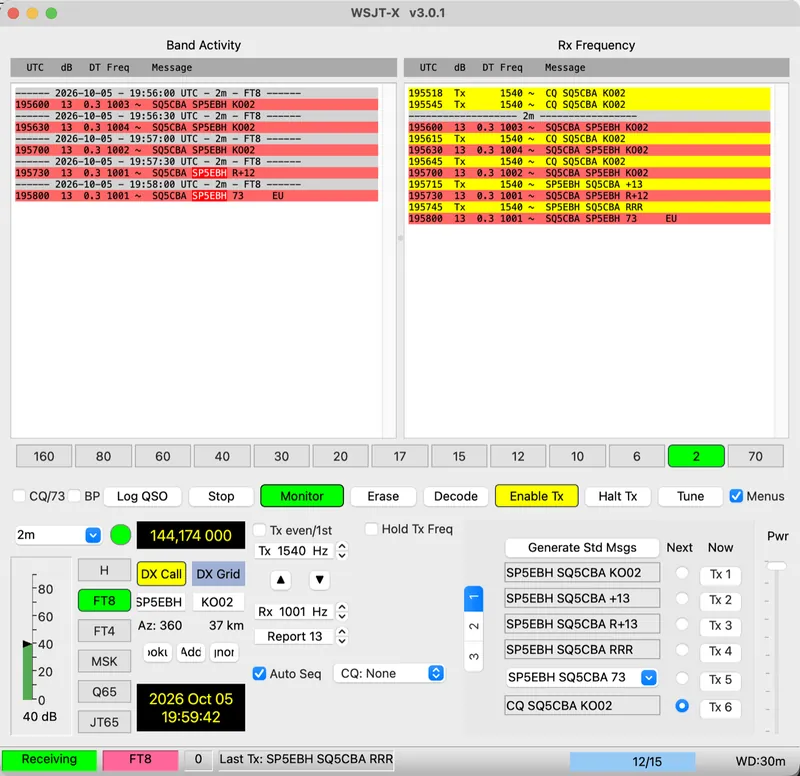
    WSJT‑X just after the QSO

    Screenshot at 19:59:42 UTC, shortly after the 73 from SP5EBH. Hover over the number or the description to see which part of the window it refers to.

    WSJT‑X 3.0.1 window after the QSO with SP5EBH: list of decodes, frequency 144.174 000, Tx1 to Tx6 messages
    1. Band Activity. Everything the decoder caught on the band, period by period. Red lines are messages addressed to me.
    2. Rx Frequency. The exchange on my frequency. Yellow lines are my transmissions, red ones are SP5EBH’s replies.
    3. The “SQ5CBA SP5EBH 73” line. 195800 is the period time, 13 is the report in dB, 0.3 is DT — the time offset in seconds — and 1001 is the tone in Hz.
    4. 144.174 000 is the radio’s carrier frequency. The signal sits higher by an audio tone: for me 144.174 MHz + 1540 Hz = 144.17554 MHz. WSJT‑X wrote this value to the log.
    5. DX Call and DX Grid: who I’m talking to. Bearing 360° and 37 km are from calculating to the centre of grid square KO02, because SP5EBH only gave that much of the locator. In reality we’re 7 km apart.
    6. Tx 1540 Hz and Rx 1001 Hz: the tone I transmit on, and the tone I’m listening on. In FT8 they don’t have to be the same.
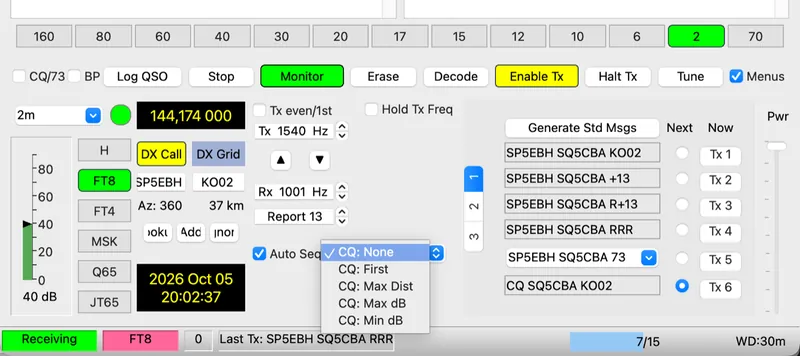
    7. Auto Seq and the ‘CQ’ field. Auto Seq carries the QSO on by itself. With ‘CQ: None’ the program won’t answer stations calling my CQ. With ‘CQ: First’ it answers the first one.
    8. Enable Tx. Turns transmit on, then it lights red. With Auto Seq enabled the program turns it off by itself after each QSO. The yellow colour of the button and the DX Call field is a warning: the ‘Wait’ functions are enabled and the program may transmit by itself when a station in the DX Call field calls.
    9. Tx1–Tx6: canned QSO messages. The ‘Next’ dot shows what will go in the next period, the ‘Now’ button sends immediately.
    10. Status bar: the last message sent (RRR) and “WD:30m”, i.e. the transmit watchdog. After 30 minutes without a QSO WSJT‑X will stop calling on its own.
    11. Audio level from the radio: 40 dB on band noise alone.
    AI assistant at the radio

    What Claude Code did

    Claude Code is a tool from Anthropic: an AI assistant that runs in a terminal, reads and edits files, and runs commands. It usually helps developers. At my station over several evenings it hunted for faults in the radio’s network path, and on 5 October it prepared the station for FT8 and watched over the QSO. This article was also put together with it.

    Division of roles

    I am the licensed operator and I decided when we transmitted. Claude Code was authorised to run commands on my Mac on its own, but it did what I asked it to. WSJT‑X doesn’t allow fully automatic QSOs anyway: with Auto Seq it turns transmit off after each QSO.

    What it did on 5 October

    • checked whether the radio responded on the network, and read its settings with its own Python program written earlier based on wfview’s open‑source code;
    • switched the radio from the SR5W repeater (145.750 MHz, −600 kHz shift) to 144.174 MHz USB‑D with no offset and verified it would transmit on the correct frequency;
    • started wfview and WSJT‑X, adjusted the squelch and volume, checked the clock and audio level, set power to 35%;
    • watched the decode file, suggested what to click when WSJT‑X wasn’t replying to SP5EBH, and with a screenshot checked that I’d clicked the right thing;
    • after the session it closed the programs and restored the radio exactly to the pre‑FT8 state: SR5W channel, squelch, volume and power;
    • for this article it gathered sources, calculated the tones, drew a map from PSK Reporter data and made the animations. The topic and decisions are mine.
    claude · terminal · 5.10.2026
    # 21:48 Polish time: does the radio respond on the network at all?
    ping -c 3 192.168.0.212
    3 packets transmitted, 3 packets received, 0.0% packet loss
    python3 ic9700_przeglad.py --tylko 03,04,0f,1659,1a050116
    03 → 145.750 MHz   04 → FM   0f → DUP− (repeater)
    1659 → Dual Watch off   1a050116 → DATA MOD = LAN
    # The radio is on the SR5W repeater with a −600 kHz shift. First switch to VFO and simplex.
    python3 ic9700_zapis.py --plan plan_ft8.json
    07            VFO mode                 FB
    0f10          simplex, no offset       FB
    050040174401  144.174 MHz              FB
    060101        USB, filter 1            FB
    1a060101      data mode (USB-D)        FB
    14030000      squelch 0                FB
    python3 ic9700_przeglad.py --tylko 1c03
    1c03 → transmit frequency 144.174 MHz ✓
    open -a wfview
    rigctld listening on 127.0.0.1:4533 (after 4 s)
    # after connecting, wfview set its own SQL 0.43 and AF 1.0. I correct it via rigctld.
    echo 'L SQL 0' | nc 127.0.0.1 4533; echo 'L AF 0.22' | nc 127.0.0.1 4533
    RPRT 0   RPRT 0
    sntp time.apple.com
    +0.165875 +/- 0.045142 time.apple.com
    open -a wsjtx
    ffmpeg -f avfoundation -i ":BlackHole 16ch" -t 6 -af astats -f null -
    RMS level dB: -49.96   (approx. 40 dB on the WSJT-X meter)
    echo 'L RFPOWER 0.35' | nc 127.0.0.1 4533
    RPRT 0   (power approx. 37 W, same as the day before)
    # 19:55 UTC: Filip turns on Enable Tx. I’m watching the ALL.TXT file.
    195545  Tx        1540  CQ SQ5CBA KO02
    195600  Rx  +13   1003  SQ5CBA SP5EBH KO02
    195615  Tx        1540  CQ SQ5CBA KO02
    # SP5EBH replies, but WSJT-X keeps calling CQ. You need to click his line twice.
    195715  Tx        1540  SP5EBH SQ5CBA +13
    195730  Rx  +13   1001  SQ5CBA SP5EBH R+12
    195745  Tx        1540  SP5EBH SQ5CBA RRR
    195800  Rx  +13   1001  SQ5CBA SP5EBH 73
    tail -1 wsjtx_log.adi
    <call:6>SP5EBH <rst_sent:3>+13 <rst_rcvd:3>+12 <band:2>2m <time_off:6>195811
    # The QSO is in the log. ADIF copy to upload to QRZ.com: ~/Downloads.
    The CI‑V command that set 144.174 MHz Eleven bytes: FE FE to start, A2 is the IC‑9700 address, E0 the controller address, 05 is the set‑frequency command, five bytes of the frequency encoded as BCD digits from the least‑significant byte, and FD to finish. FE FE A2 E0 05 00 40 17 44 01 FD start to: IC‑9700 from: controller set freq. frequency, BCD digits from the end end read from the last byte: 01 44 17 40 00 = 0 144 174 000 Hz = 144.174 MHz Each byte is two decimal digits (BCD). The radio replies FB (“OK”) or FA (“error”).

    ← scroll sideways to see it all →

    This is how Claude Code set 144.174 MHz. CI‑V is the language by which Icom radios talk to a computer. The same command can be sent by cable or over the network. A2 is the default IC‑9700 address (according to the manual), E0 is the computer’s address. After each command the radio replies FB (“OK”) or FA (“error”).
    Slip‑ups

    Not everything went smoothly

    • we both clicked Enable Tx in the same second, so TX turned off after one CQ
    • when wrapping up, the first attempt to stop didn’t turn off Enable Tx and one more CQ went out
    • the day before, his decoder test sent PSK Reporter a false spot with a made‑up callsign
    • after each slip‑up he noted what went wrong so it wouldn’t be repeated next time
    Takeaways

    Where AI helps

    • most of all in the slog of root‑cause hunting: logs, radio menus, settings of three programs at once
    • with transmitting gear every step should be visible and reversible: changes went in from plan files, and the radio state was read before and after
    • only one person should be on the mouse at a time
    • responsibility for every transmission stays with the operator
    What we tripped over

    Ten pitfalls from a real session

    Each of them cost me at least one evening. I did the first network trials in July, and transmitting didn’t start until 4 October.

    1. The radio responds to ping, and wfview says “No response”

      The network works, but the radio won’t let the program in. In the IC‑9700 menu, network control has its own switch.

      → SET › Network › Network Control = ON
    2. The radio is transmitting, but power is 0 W

      The audio path to the modulator was coming from USB, not from the network. The FT8 settings in the radio had switched DATA MOD to USB.

      → SET › Connectors › MOD Input › DATA MOD = LAN
    3. Waterfall full of noise, but zero decodes

      The IC‑9700 has two receivers. CAT was tuning one to 144.174, but the audio over the network was coming from the other, set to 145.000.

      → single receiver (MAIN), Dual Watch off
    4. Black bands on the waterfall

      With squelch (SQL) enabled, the audio arrived in chunks, with 2–4 s gaps. On connection, wfview would set SQL 0.43 by itself.

      → SQL = 0, corrected after every wfview launch
    5. Repeater channel and “Fake It”

      The radio was on a memory channel with a −600 kHz shift. WSJT‑X’s “Fake It” then throws an error. Worse would be if the offset remained active on TX.

      → before WSJT‑X: VFO, simplex, check the transmit frequency
    6. Audio level almost zero

      The BlackHole 16ch virtual card has 16 channels, and the “Mono” setting in WSJT‑X was averaging all of them. The signal was only on two of them.

      → WSJT‑X › Audio › input: Left channel
    7. wfview quits on its own

      On macOS 26 the program was crashing a few seconds after connecting to the radio. First its own waterfall was to blame, then reading audio from BlackHole 16ch.

      → wfview waterfall disabled, TX via BlackHole 2ch, RX via 16ch
    8. False spot on PSK Reporter

      While testing the decoder I fed WSJT‑X a signal from the ft8sim program with a made‑up callsign. WSJT‑X reported it to PSK Reporter as a genuine reception.

      → during tests: PSK Reporter disabled
    9. Someone is calling and the program stays silent

      SP5EBH called me three times, and WSJT‑X replied with another CQ. The “CQ: None” field was to blame.

      → “CQ: First” or two clicks on the caller’s line
    10. Two hands on one mouse

      I clicked Enable Tx in the same second as Claude Code. Two clicks are on then off, so one CQ went out and that was it.

      → one person at the mouse at a time
    WSJT‑X window fragment with the list expanded: CQ: None, CQ: First, CQ: Max Dist, CQ: Max dB, CQ: Min dB
    The “CQ” list in WSJT‑X 3.0. With “CQ: None” the program does not automatically reply to answers to my CQ. “First” picks the first caller, “Max Dist” the most distant, “Max dB” and “Min dB” the strongest or the weakest. Screenshot from 5.10.2026, 20:02 UTC.
    PSK Reporter

    Who heard me

    PSK Reporter collects automatic reception reports from programs such as WSJT‑X. All you have to do is call CQ, and after a few minutes the map shows who heard me and with what report. The service is run by Philip Gladstone N1DQ and does not transmit anything itself.

    Who heard SQ5CBA’s CQ on 144.174 MHz on 5 October 2026 Map with Warsaw in the centre. Fifteen stations that reported reception to PSK Reporter, from 7 km (SP5EBH) to 355 km (LY2WR-3 in Lithuania). 100 km 200 km 300 km 400 km Gdańsk Poznań Łódź Kraków Lublin Białystok Vilnius Kaunas Brest Grodno Katowice Olsztyn Kaliningrad Bydgoszcz Rzeszów Wrocław SP5QWK 72 km · −17 dB SQ5TF 89 km · −9 dB SP7VVB 101 km · −18 dB SP8ZOC 116 km · no report SR4DON 172 km · −24 dB SQ2HCZ 221 km · −15 dB SQ9NKX WebSDR 223 km · −21 dB SP3CUG 293 km · −13 dB SR9NSK 312 km · −14 dB LY2WR-3 355 km · −24 dB SQ5CBA · KO02ME · Warsaw SP5EBH 7 km · +10 dB SP5XMU 8 km · −5 dB SP5QAT 16 km · +6 dB SP5AOZ 17 km · +11 dB SP5QWB 45 km · −3 dB Reception report (SNR in 2.5 kHz) 0 dB and above −1…−15 dB below −15 dB Data: PSK Reporter, 5.10.2026, 19:55–20:10 UTC · boundaries: Natural Earth N ↑

    ← scroll sideways to see it all →

    15 stations that received my CQ on 5 October between 19:55 and 20:10 UTC. The map is centred on my QTH and the distances from the centre are true. The nearest was SP5EBH (7 km, +10 dB), the farthest LY2WR‑3 in Lithuania (355 km, −24 dB). The dot colour is the reception report. Locators come from PSK Reporter, and I calculate distances as great‑circle distances, same as in the locator calculator.

    What the data shows

    Over a quarter of an hour of calling (power about 37 W, vertical X‑200N antenna) PSK Reporter received 15 reception reports: 5 from Warsaw and surroundings and 10 from distances between 72 and 355 km. The three weakest were −21, −24 and −24 dB, i.e. right on the decoder’s limit.

    The day before, 4 October, my CQ was decoded by, among others, EW6FS from Belarus: 504 km, −19 dB. That is the most distant reception of my signal on 2 m I have seen so far.

    The other way round it was worse. In that same quarter of an hour I decoded only SP5EBH, and on the evening of 4 October I decoded no one, even though according to PSK Reporter there were 5–7 stations transmitting at distances of 66 to 270 km. Why that was, I explain below.

    At the time of my screenshot PSK Reporter saw 6,351 active FT8 monitors worldwide, of which 271 on 2 m. FT8 accounted for about 92% of all reports in the last two hours, but that is a statistic of automatic reports, not of QSOs.

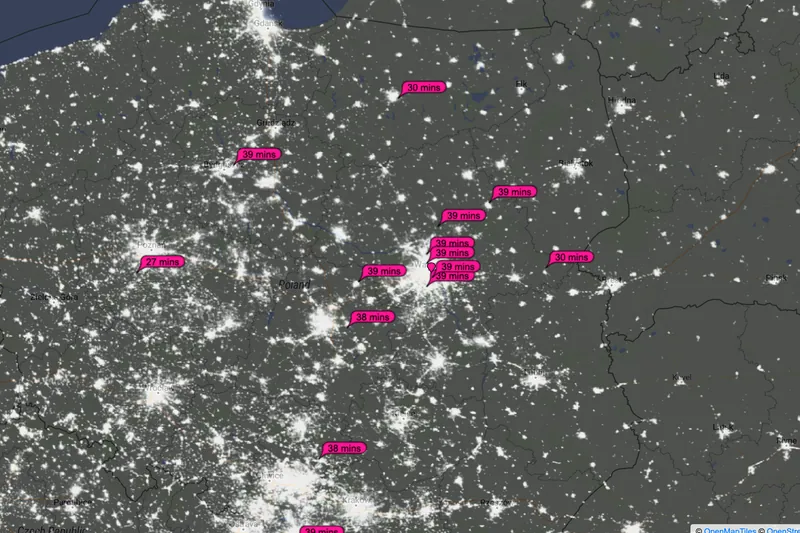
    PSK Reporter map: Poland at night, bubbles with report times at stations that received SQ5CBA PSK Reporter, 5.10.2026 about 20:37 UTC · map © OpenMapTiles © OpenStreetMap
    Antenna

    Vertical antenna on a horizontal band

    For FT8, SSB and CW on 2 m horizontally polarised antennas are used. The IARU has never formally recommended this, but that is common practice. Vertical is the standard on FM and on repeaters. My X‑200N is vertical because it is mainly for FM.

    How much it costs

    The ARRL Antenna Book states that with cross‑polarisation you should expect additional losses of 20 dB or more. In theory, with antennas set perfectly at right angles, no power would get through.

    20 dB is a hundred times less power. In FT8 that is the difference between a decode at −5 dB and a −25 dB signal that the decoder won’t decode.

    What I saw in practice

    Fifteen stations copied me, but I decoded only one, 7 km away. Gary Hinson ZL2IFB’s FT8 guide advises: if others hear you much better than you hear them, improve your reception or reduce power. For me the first step will be a horizontal beam antenna, even a small Yagi.

    You can build such an antenna yourself. I described it in the article about a Yagi antenna for 2 m and 70 cm.

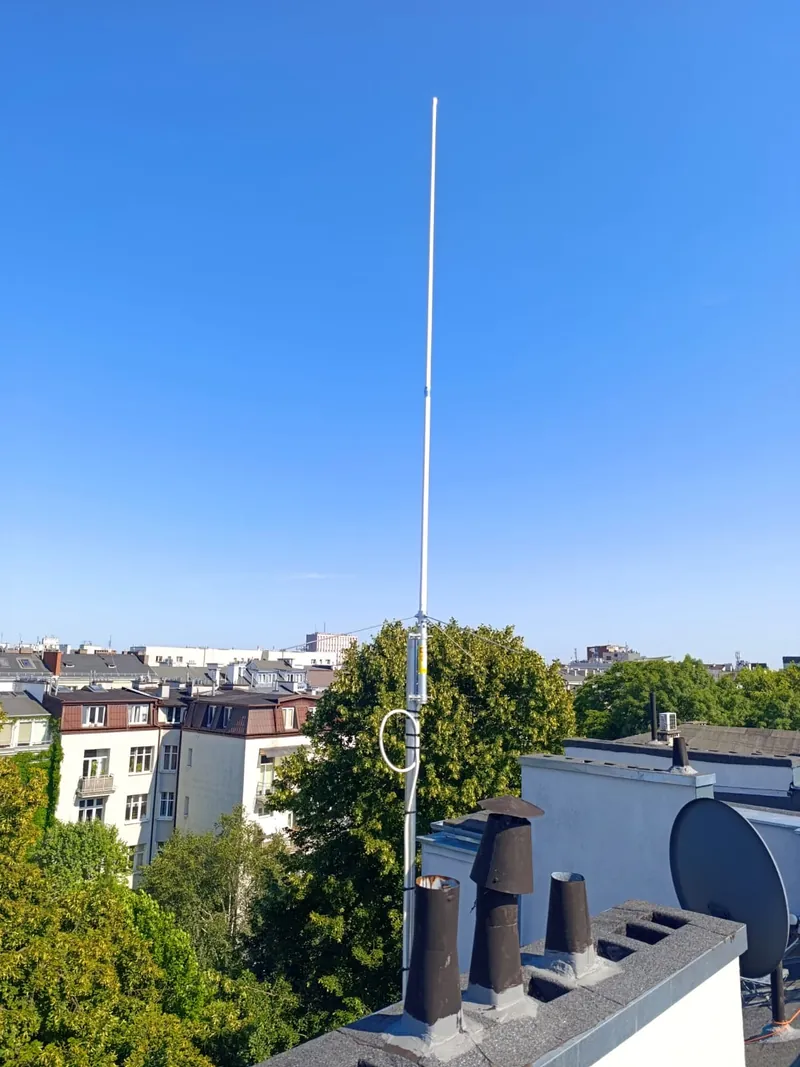
    Diamond X-200N vertical collinear antenna on a mast on a tenement roof, with the sky and Mokotów rooftops in the background My X‑200N in Mokotów · 24 m above ground
    Vertical and horizontal polarisation On the left a vertical collinear antenna, the electric field oscillates vertically. On the right a horizontal Yagi antenna, the field oscillates horizontally. With antennas set at 90 degrees the power theoretically does not get through; in practice you lose 20 dB or more. verticalX-200N: FM, repeaters horizontalYagi: SSB, CW, FT8 90° theory: no power gets through practice (ARRL): −20 dB or more E = direction of the electric field oscillation
    Vertical versus horizontal. An antenna receives the component of the electric field that oscillates along its elements. A vertical and a horizontal antenna ‘miss’ each other by 90°.
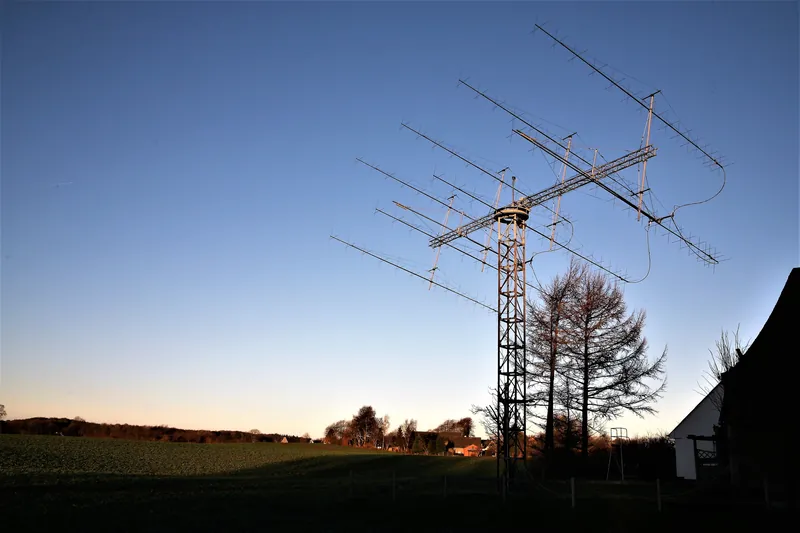
    Lattice mast with a large stack of long 2 m Yagi antennas against the evening sky
    Array of 2 m Yagi antennas at DK5LA. For weak signals on this band, long directional antennas are used. For FT8, a much smaller one will do · photo: Reinhard Kuehn DK5LA, CC BY‑SA 4.0
    After the QSO

    Log, QRZ and what next

    The contact goes into the file wsjtx_log.adi in ADIF format, which every log and service accepts. Claude Code prepared the file containing the QSO with SP5EBH for uploading to QRZ.com. I described how to do that in the guide QRZ and logbook. Below are five things I would do from the start if I were beginning again.

    1

    Listen first

    Set 144.174 MHz, put WSJT‑X in FT8 mode, and just watch for a quarter of an hour. If anything decodes, the receive chain is working. The manual advises setting the noise level on the meter to about 30 dB and switching AGC off or limiting its action.

    FT8 · USB‑D · 144.174 MHz · noise approx. 30 dB
    2

    Clock and power

    A clock accurate to within a second. Power in moderation: FT8 is a weak‑signal mode, and ZL2IFB’s guide explicitly asks you not to overdo the power. Each transmission lasts 12.64 s at constant power, so the radio heats up as with a carrier, not as with voice.

    3

    Answer next to the caller

    When replying to someone’s CQ, pick a free tone and tick Hold Tx Freq. Double‑clicking the decode will automatically set the period in which you should transmit.

    4

    Check PSK Reporter

    On the map pskreporter.info enter your callsign and choose ‘sent by’. A few minutes after your CQ you’ll see who copied you. In WSJT‑X it’s enough to enable reporting to PSK Reporter and enter your 6‑character locator.

    5

    Horizontal antenna

    If others hear you much better than you hear them, the problem is on the receive side. On 2 m the first step is a horizontal antenna. Once it’s ready, it’s worth trying meteor scatter and autumn tropo as well.

    Sources

    Where these numbers come from

    1. S. Franke K9AN, B. Somerville G4WJS, J. Taylor K1JT, “The FT4 and FT8 Communication Protocols”, QEX, July/August 2020 · wsjt.sourceforge.io
    2. WSJT‑X User Guide 3.0.0 · wsjt.sourceforge.io
    3. WSJT‑X Release Notes (from 1.8.0 to 3.2.0‑rc1) · wsjt.sourceforge.io
    4. WSJT‑X source code: default frequency table (FrequencyList.cpp) and the FT8 decoder (sync8.f90) · github.com
    5. IARU Region 1 VHF Handbook, version 10.03 (February 2026) · www.iaru-r1.org
    6. ARRL: “FT8 Mode is Latest Bright, Shiny Object in Amateur Radio Digital World”, 1.08.2017 · www.arrl.org
    7. ARRL / Club Log, M. Wells G7VJR: “Mode Usage Evaluation: 2017 Was the Year When Digital Modes Changed Forever” · www.arrl.org
    8. Club Log, DX Report (week 28.09–5.10.2026) · clublog.org
    9. PSK Reporter: map, statistics and reception data for SQ5CBA from 5.10.2026 · pskreporter.info
    10. Nobel Prize in Physics 1993, press release · www.nobelprize.org
    11. Icom IC‑9700: product page and basic manual (Basic Manual) · www.icomjapan.com
    12. wfview: project page and rigctld emulation manual · wfview.org
    13. G. Hinson ZL2IFB, “FT8 Operating Guide” · www.g4ifb.com
    14. ARRL Antenna Book, chapter 18 “VHF and UHF Antenna Systems”: cross‑polarisation loss
    15. Claude Code: Anthropic documentation · code.claude.com
    16. Own data: ALL.TXT and wsjtx_log.adi from WSJT‑X 3.0.1, tones from the ft8code program, screenshots from 5.10.2026

    I list FT8 parameters for WSJT‑X 2.1 and later. In 2017 FT8 worked a little differently (75 bits, LDPC (174,87) code, −20 dB threshold), so older write‑ups online may quote different numbers. Club Log and PSK Reporter statistics change from day to day.

    Next step

    Listen on 144.174 and call CQ

    The simplest start: radio in USB‑D, WSJT‑X in FT8 mode, and a quarter of an hour of listening. Here on 2 m there were many listening and few transmitting, so even a single CQ will leave a trace on the PSK Reporter map. If you hear me, let me know in the guestbook.